
A laptop docking station helps turn a portable computer into a full workstation. It connects your laptop to monitors, keyboards, and other accessories with one plug. This setup can make your workspace more organized and your workflow more efficient.
Different docking stations offer different connection types, like USB-C, Thunderbolt, or HDMI. The most important thing to check before buying is compatibility with your laptop’s ports and power needs. Other factors, such as the number of ports, charging speed, and build quality, also affect performance and convenience.
We spent hours comparing and testing several docking stations to find the ones that deliver reliable connections, fast charging, and simple setup.
Best Laptop Docking Stations
We researched and compared top docking stations to find the most reliable options for work and home setups. Our picks offer strong performance, easy connectivity, and solid build quality to help us get more done with fewer cables.
UGREEN Revodok Pro 9-in-1 USB-C Hub


- 9 in 1 USB-C Hub: This USB C ethernent hub turns a single USB-C port into 9 ports with a 4K@60Hz HDMI, gigabit ethernet,…
- Stable Gigabit Ethernet Connection: USB C hub comes with Gigabit RJ45 ethernet port that supports 1000Mbps with faster, …
- 4K HD Visuals: USB C Dock is equipped with a 4K@60Hz HDMI port. Enjoy visually stunning movies, high-definition online m…

This hub is a solid choice for anyone who wants to expand their laptop’s ports without adding clutter to their desk.
Pros
- Compact design feels sturdy and well-built
- Reliable Ethernet and HDMI connections
- Fast data transfer for drives and accessories
Cons
- Can get warm during long use
- HDMI port depends on laptop compatibility
- Power delivery port only supports charging
We found the UGREEN Revodok Pro easy to set up and use right away. It connected smoothly to our MacBook, and the aluminum body gave it a premium feel. The ports are spaced well, so plugging in multiple devices didn’t feel cramped.
The Ethernet connection stayed stable during video calls and large file uploads. We noticed no lag or dropouts, which made it dependable for work. The HDMI output delivered crisp 4K visuals, though users should confirm their laptop supports video output through USB-C before buying.
Charging through the 100W PD port kept our laptop powered even with several devices attached. The hub did warm up a bit under heavy load, but not enough to cause concern. Overall, the Revodok Pro delivers strong performance for its price and makes multitasking much smoother.
Baseus Nomos Win Air 12-in-1 Docking Station

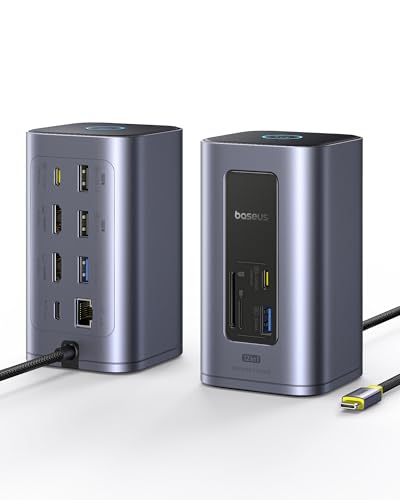
- 12 in 1 Docking Station: Say goodbye to cable clutter and embrace simplicity with our all-in-one usb c docking station! …
- Dual 4K Display for Maximum Productivity: The docking station dual monitor transform your workspace with stunning 4K vis…
- Blazing-Fast 10Gbps Data Transfer: Streamline your workflow with lightning-fast 10Gbps data transfer. Transfer massive f…
We recommend this docking station for anyone who wants a simple, reliable way to connect multiple devices and dual monitors without clutter.
Pros
- Handles two 4K monitors smoothly
- Compact design keeps desks organized
- Fast data transfer and solid Ethernet connection
Cons
- Power adapter not included
- Gets slightly warm after long use
- Cable placement can feel tight in small spaces
We recently set up the Baseus Nomos Win Air in our workspace, and it made an immediate difference. The dual 4K HDMI ports worked right away, letting us extend our screens without flicker or lag. The image quality stayed sharp, even when switching between design apps and spreadsheets.
The six USB ports came in handy for connecting drives, a keyboard, and a webcam. File transfers felt quick thanks to the 10Gbps speed, which saved time when moving large video files. The Ethernet port gave us a steady connection that felt faster than Wi-Fi.
Although the dock doesn’t include its own power adapter, our laptop charged fine through the 100W PD port once we used a compatible charger. It does get warm after long sessions, but not enough to worry us. Overall, this Baseus dock keeps our setup neat and productive without unnecessary fuss.
Anker Prime TB5 Dock


- 14-in-1 Thunderbolt 5 Dock: Equipped with a Thunderbolt 5 upstream port, two Thunderbolt 5 downstream ports, two USB-C p…
- The Speed You Need for Large Files: Transfer massive files quickly—move a 150GB file in just 25 seconds with the Thunder…
- Dual Display Docking Station: Supports one HDMI or DisplayPort and two Thunderbolt 5 downstream video outputs. Delivers …
We recommend this docking station for users who want strong performance, fast data transfer, and a clean one-cable setup for modern laptops.
Pros
- Handles multiple high-resolution displays smoothly
- Transfers large files very quickly
- Keeps cool even under heavy use
Cons
- Price is higher than most docks
- Some audio interference with external DACs
- Occasional connection drops with certain Macs
We recently used the Anker Prime TB5 Dock to simplify our workspace, and it made a noticeable difference. Connecting both a MacBook and a Windows laptop was easy, and switching between them took seconds. The dock powered everything with one cable, which kept our desk tidy.
During testing, we moved large video files, and the speed impressed us. The Thunderbolt 5 ports handled transfers without lag or slowdown. We also liked that the dock stayed cool thanks to its built-in cooling system, even when powering multiple devices.
However, we did notice a few small issues. Audio users might hear faint noise when using external DACs, and some Macs occasionally drop connections. Despite that, the build quality feels premium, and for those who rely on multiple monitors or high-speed transfers, this dock delivers stable performance worth its cost.
Plugable Thunderbolt 4 Dock


- Award Winning Plugable Thunderbolt 4 Dock: Premium 16-in-1 design enables dual 4K 60Hz screens on M4 Macs, Windows and U…
- Seamless Dual Monitor Setup for M4 Macs: This dual monitor for laptop docking station enables two 4K 60Hz displays via H…
- 100W Power Delivery: Ensure all-day laptop charging with 100W Power Delivery. Third party lab tested to UL standards for…
We recommend this dock for anyone who wants a reliable, all-in-one hub that keeps a desk clean and supports dual 4K monitors without fuss.
Pros
- Handles two 4K displays smoothly with no setup issues
- Feels sturdy and well-built with a clean design
- Provides plenty of ports for daily use
Cons
- Runs warm after long sessions
- Takes up more desk space than smaller hubs
- Premium price compared to basic docks
We used this Plugable dock with both a MacBook Pro and a Windows laptop, and it worked the same way on each. The dual 4K output ran smoothly, and we didn’t need to install any drivers. Plugging in accessories felt simple, and the 100W charging kept our laptop powered all day.
The aluminum body looks professional and feels solid. We liked having all the ports—USB, Ethernet, and SD slots—on one device instead of juggling separate adapters. It made switching between devices quick and dependable.
It does get a bit warm when running two monitors and several peripherals, but not enough to cause problems. The size might be more than some need, yet for a full workstation setup, it’s a fair trade. Overall, we found the Plugable Thunderbolt 4 Dock dependable and worth the cost for users who want stable performance and strong connectivity.
CalDigit TS4 Thunderbolt 4 Dock


- 18 Ports of Extreme Connectivity – Featuring an impressive 18 ports, the TS4 has enough connectivity for even the most d…
- Powerful 98W Charging – The TS4’s power delivery is ideal for any Thunderbolt or USB-C (with data, video, and power supp…
- Single 8K or Dual 6K 60Hz Displays – Windows users can connect a single monitor up to 8K resolution. macOS users can con…
We recommend this dock for anyone who needs a reliable, high-performance hub to manage multiple devices through one cable.
Pros
- Handles heavy workloads with stable performance
- Provides strong 98W laptop charging
- Offers flexible display and network options
Cons
- Runs warm under load
- Costs more than basic docks
- Takes up moderate desk space
We found the CalDigit TS4 easy to set up and quick to recognize our devices. Plugging in a single Thunderbolt cable powered our laptop and connected everything else instantly. The aluminum body feels durable, and the ports are spaced well for easy access.
During testing, we appreciated how it handled two high-resolution monitors without lag. File transfers through the USB ports felt fast, and the Ethernet connection stayed steady. The dock kept our workspace neat by reducing cable clutter.
It did get warm after long use, but not dangerously so. The price is higher than average, yet the build quality and reliability make it worth it for those who depend on stable performance. For professionals or home users who need serious connectivity, the TS4 delivers consistent results.
Buying Guide
When we choose a laptop docking station, we should focus on compatibility first. It must match our laptop’s operating system, ports, and power needs. Checking the manufacturer’s specifications helps avoid connection issues later.
We should also consider port selection. A good docking station offers a balance of USB, HDMI, DisplayPort, and audio ports. More ports can make it easier to connect monitors, keyboards, and external drives.
Power delivery (PD) matters if we want to charge our laptop through the dock. We should look for a dock that provides enough wattage to power our device without slowing performance.
| Feature | What to Check | Why It Matters |
|---|---|---|
| Compatibility | Works with our laptop’s OS and ports | Ensures stable connection |
| Port Variety | USB-C, HDMI, DisplayPort, Ethernet | Supports multiple devices |
| Power Delivery | 60W, 90W, or higher | Charges laptop efficiently |
| Build Quality | Durable materials, compact design | Lasts longer and saves space |
We should think about display support if we plan to connect multiple monitors. Some docks handle two or more displays, while others support only one. Checking the maximum resolution helps ensure clear visuals.
Lastly, we should pay attention to data transfer speed. USB 3.0 or higher gives faster file transfers. If we work with large files, this can save time and improve productivity.
Frequently Asked Questions
We focus on the key details that help users choose a docking station that matches their setup. We consider features, compatibility, monitor support, value, design type, and power delivery performance.
What are the top features to look for in a high-quality laptop docking station?
We look for multiple USB ports, HDMI or DisplayPort outputs, Ethernet, and audio jacks.
A reliable docking station should also offer stable data transfer speeds and power delivery support.
Compact design and durable build quality make daily use easier.
How do compatibility and connectivity options vary among different laptop docking stations?
Some docking stations work only with certain brands or operating systems.
Others use universal standards like USB-C or Thunderbolt, allowing wider compatibility.
We check the supported connection type to ensure it matches our laptop’s ports.
What are the best docking stations for laptops with multiple monitors support?
Docking stations with dual or triple video outputs handle multi-monitor setups well.
Models with DisplayPort and HDMI ports usually support higher resolutions and refresh rates.
We confirm that the station supports the display configuration we need before buying.
Can you recommend docking stations that offer the best value for money?
We find good value in docking stations that balance performance, build quality, and price.
Brands like Anker, Plugable, and Dell offer reliable options with strong feature sets.
We compare specifications and warranty coverage to make cost-effective choices.
What is the difference between proprietary and universal laptop docking stations?
Proprietary docking stations are designed for specific laptop models or brands.
Universal docking stations work with many laptops through USB-C or Thunderbolt connections.
We prefer universal options for flexibility across different devices.
How does the power delivery capability of a docking station affect laptop performance?
Power delivery determines how much wattage the dock can supply to the laptop.
Higher power output supports faster charging and stable performance under heavy use.
We make sure the dock’s power rating matches or exceeds our laptop’s requirements.





