
An audio interface connects microphones, instruments, and other sound sources to a computer. It converts analog signals into digital data, allowing us to record and edit high-quality audio. Whether we’re recording music, podcasts, or voiceovers, a reliable audio interface is essential for clear sound and consistent performance.
The most important factors to consider are sound quality, input and output options, and compatibility with your setup. Beginners may want a simple, two-channel interface, while experienced users might need more inputs for multiple instruments or microphones. Choosing the right audio interface ensures clean recordings, low latency, and smooth workflow for any project.
We spent hours researching and testing top-rated models to find the best audio interfaces that deliver dependable performance and great value.
Best Audio Interfaces
We researched and compared top audio interfaces to find the most reliable options for recording and producing music. Our picks balance sound quality, connection options, and ease of use for both beginners and professionals. Below is our list of the best audio interfaces available today.
Behringer UM2 Audio Interface


- STUDIO IN A LITTLE BLACK BOX: When creativity strikes, you need a fast and easy way to get those musical ideas into your…
- SEAMLESS INTEGRATION WITH POPULAR DAWS: The ultra-compact UM2 is totally compatible with virtually all popular recording…
- SONICALLY SUPERIOR MIC PREAMP: The studio-grade XENYX mic preamp used in the UM2 offers a staggering 100 dB dynamic rang…

A solid pick for beginners or anyone needing a simple, portable interface that delivers clean sound without extra setup.
Pros
- Compact and easy to carry
- Clear audio with low noise
- Quick setup and plug-and-play design
Cons
- Plastic build feels light
- Limited to basic recording needs
- No extra software features
We found the Behringer UM2 surprisingly capable for its size. It handled vocals and instruments well, and the XENYX preamp produced a clean, balanced signal. The direct monitoring switch made it easy to hear our takes in real time without delay.
The interface connected quickly to our laptop and worked right away with our recording software. We didn’t need to install any drivers, which saved time. It’s ideal for quick sessions or small setups where space is tight.
While the plastic body doesn’t feel premium, it keeps the unit light and travel-friendly. We wouldn’t rely on it for heavy studio use, but for home recording or podcasting, it’s a dependable and affordable choice.
Focusrite Scarlett 2i2 4th Gen


- The new generation of the artist’s interface: Connect your mic to Scarlett’s 4th Gen mic pres. Plug in your guitar. Fire…
- Studio-quality sound: With a huge 120dB dynamic range, the newest generation of Scarlett uses the same converters as Foc…
- Never lose a great take: Scarlett 4th Gen’s Auto Gain sets the perfect level for your mic or guitar, and Clip Safe preve…
This audio interface is a smart buy for anyone who wants clean, consistent recordings without spending a lot of time adjusting levels.
Pros
- Auto Gain and Clip Safe make setup fast and foolproof
- Clear, balanced sound with strong headphone output
- Comes with useful software for recording and mixing
Cons
- Metal body can get warm after long sessions
- Included software bundle takes time to install
- Only two inputs may limit bigger setups
We found the Scarlett 2i2 easy to set up and reliable from the start. The build feels solid, and the aluminum case gives it a professional touch. Plugging in a mic or guitar takes seconds, and the Auto Gain feature quickly finds the right input level.
When we recorded vocals and acoustic guitar, the sound came through smooth and natural. The Air mode added a bit of brightness that helped our tracks stand out without harshness. The headphone output also delivered a strong signal, which made monitoring more accurate.
The bundled software gives beginners a full toolkit to start recording right away. However, we noticed that downloading and activating everything takes some patience. For small studios, podcasts, or solo projects, though, the Scarlett 2i2 4th Gen delivers dependable performance and great sound quality.
Audient iD14 MKII


- The new successor: Due to the great success of the Audient iD14, the audio experts had the project to bring the successo…
- Harmonious overall package: Thanks to new transducer technology and two Class-A microphone preamps from Audient’s high-e…
- New connector: The new Audient iD14 MKII now has a high-speed USB-C connector, so handling is easier and power supply is…
This is a dependable audio interface for anyone who wants clean sound and solid build quality without paying for unnecessary extras.
Pros
- Delivers clear, detailed audio through its Class-A preamps
- Strong metal body feels durable and travel-ready
- USB-C connection makes setup simple and fast
Cons
- Single control knob can be confusing at first
- Software setup takes a little time to learn
- Limited input options for larger recording setups
We found the Audient iD14 MKII easy to integrate into our workspace. The preamps sound clean and natural, and we noticed how quiet the noise floor was when recording vocals and instruments. It handled different microphones without adding unwanted color to the sound.
The metal housing feels sturdy, and the compact shape fits nicely on a desk. We liked the USB-C connection because it reduced cable clutter and powered the unit directly from the computer. It made switching between laptops and desktops quick.
It took a short time to get used to the single control knob, but once we learned the layout, adjusting levels and switching functions became straightforward. For small studios or home setups, this interface offers a balanced mix of sound quality and usability.
Focusrite Scarlett 18i20 4th Gen
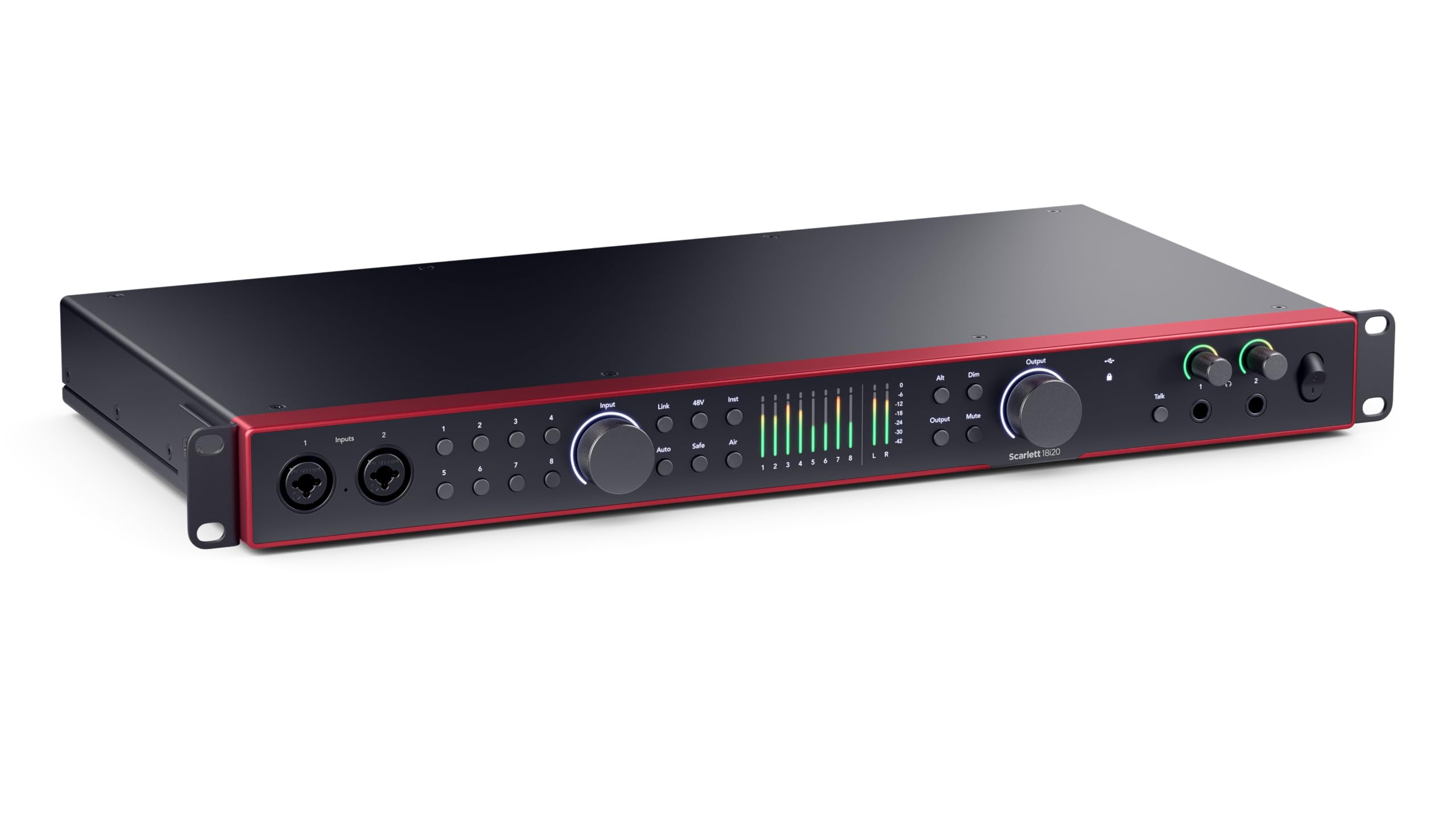

- The engineer’s interface: Scarlett 18i20 features 18 inputs and 20 outputs, including eight mic preamps, Hi-Z, line inpu…
- Capture everything: The 4th Generation preamps provide 69dB of gain, with two Hi-Z inputs and eight line inputs for vers…
- Audio quality beyond its class: Equipped with 24-bit, 192kHz converters from our flapship RedNet range, offering a 122dB…
This interface is a solid choice for anyone running a project studio who needs reliable performance and flexible connections.
Pros
- Clean, detailed sound that holds up under heavy use
- Auto Gain and Clip Safe make setup quick and stress-free
- Strong build that feels ready for daily work
Cons
- Takes up a full rack space, not ideal for small desks
- Setup software can feel a bit complex at first
- No power switch on the front panel
We recently used the Scarlett 18i20 during a multi-mic drum recording session, and the clarity across all eight preamps impressed us. The gain range handled both soft vocals and loud instruments without distortion. Auto Gain saved time by setting levels accurately on the first try.
The Focusrite Control 2 software gave us detailed routing options, but we needed a few minutes to get comfortable with it. Once configured, it made managing inputs and outputs simple. The ability to integrate hardware compressors and effects through the extra I/O made our workflow smoother.
Its aluminum body feels sturdy and professional. Although it’s not the most compact unit, it fits neatly into a rack setup and stays cool during long sessions. For a project studio that needs room to grow, the Scarlett 18i20 offers dependable performance and flexibility.
Apollo Twin X DUO Gen 2


- Experience analog tones with Unison preamps, letting you record in realtime through authentic emulations of Neve, API, A…
- Access the full library of 200+ UAD DSP and Native plug-ins, including award-winning titles like Capitol Chambers, Sound…
- Mix with confidence in any room or through headphones using Apollo Monitor Correction powered by Sonarworks
We recommend this interface for anyone who wants professional-quality sound and reliable performance in a compact desktop setup.
Pros
- Clean, detailed sound that highlights every nuance
- Real-time plugin processing feels smooth and responsive
- Solid build that looks and feels premium
Cons
- Price is higher than many competing interfaces
- Customer support can be slow to respond
- Requires Thunderbolt connection, which limits compatibility
When we tested the Apollo Twin X DUO Gen 2, the first thing we noticed was the clarity. The audio came through crisp and balanced, even when layering multiple tracks. The Unison preamps made it easy to get warm tones that felt close to analog gear.
We liked how the UAD plugins ran directly on the interface. It kept our computer free for other tasks and let us monitor effects in real time without delay. The workflow felt natural once we got into it.
The only real drawback was the setup process. Thunderbolt connectivity worked well but required some extra steps on Windows. Also, support was slow when we had a simple question. Still, once everything was running, the Twin X performed flawlessly and made recording feel effortless.
Buying Guide
When we choose an audio interface, we start by thinking about how we plan to use it. A small setup for home recording needs fewer inputs than a full studio. We should match the interface size and features to our workflow.
Inputs and Outputs matter most. We check how many microphones, instruments, or monitors we plan to connect. More inputs give flexibility, but they also raise the price.
| Feature | What to Look For | Why It Matters |
|---|---|---|
| Inputs/Outputs | Enough for our gear | Prevents frequent cable swapping |
| Preamps | Clean, low-noise sound | Improves recording quality |
| Connection Type | USB, Thunderbolt, or others | Affects speed and compatibility |
| Sample Rate/Bit Depth | At least 24-bit/96kHz | Ensures clear and accurate audio |
| Build Quality | Solid casing, reliable knobs | Withstands regular use |
We also consider latency. Lower latency means we hear sound in real time when recording or mixing. This helps us stay in sync while performing.
Software compatibility is another key factor. We check if the interface works smoothly with our computer system and recording software.
Finally, we think about portability. If we record in different places, a compact and bus-powered model makes travel easier. For a fixed studio, a larger, powered unit can offer more control and connections.
Frequently Asked Questions
We focus on the key factors that affect how an audio interface performs, connects, and fits into different setups. We also look at how to match features, connection types, and input needs to get the best results for the money spent.
What are the top features to look for in a high-quality audio interface?
We look for low latency, high-quality preamps, and clean A/D and D/A conversion. Reliable driver support and solid build quality also matter. A simple layout and durable knobs help with everyday use.
How does an audio interface impact recording quality?
An audio interface determines how clearly sound is captured and played back. Good converters and preamps reduce noise and distortion, keeping recordings accurate. Poor-quality interfaces can add hiss or dull the tone.
Can you recommend some audio interfaces that provide the best value for money?
Models like the Focusrite Scarlett series, PreSonus Studio series, and Audient iD line offer strong performance for their price. They balance sound quality, durability, and ease of use for home and project studios.
What is the difference between USB, Thunderbolt, and PCIe audio interfaces?
USB interfaces are the most common and work with most computers. Thunderbolt offers faster data transfer and lower latency, good for demanding sessions. PCIe cards install inside desktops and provide the highest speed but require technical setup.
How do I determine the right number of inputs and outputs for my audio interface?
We start by counting how many microphones, instruments, and monitors we plan to use at once. Small setups may need only two inputs, while larger sessions might need eight or more. Planning ahead prevents outgrowing the interface too soon.
What are the compatibility considerations when choosing an audio interface for my setup?
We check the operating system, connection type, and driver support before buying. Some interfaces work better with certain DAWs or platforms. Matching these details ensures stable performance and fewer setup issues.








