Ebook readers make it easy to carry thousands of books in one lightweight device. They’re designed for people who enjoy reading anywhere without the bulk of physical books. E-ink displays mimic the look of paper, which helps reduce eye strain and makes reading comfortable in bright light.
When choosing an ebook reader, people should focus on screen quality, battery life, storage size, and how easy it is to buy or borrow books on the device. Water resistance and lighting can also affect how well a reader fits daily use, especially for reading outdoors or before bed. The best ebook reader should deliver clear text, long battery life, and a smooth reading experience with minimal distractions.
We spent hours researching and testing several ebook readers to find the ones that make reading more enjoyable and convenient.
Best Ebook Readers
We reviewed the top ebook readers to find the most reliable and comfortable options for everyday reading. Our list focuses on models with sharp displays, long battery life, and user-friendly designs that make reading anywhere simple.
Kindle Paperwhite Signature Edition

Anyone who reads often and values comfort, storage, and a distraction-free experience will find this model a smart choice.
Pros
- Easy to read in any lighting with auto-adjusting brightness
- Wireless charging makes recharging effortless
- Large storage holds plenty of titles
Cons
- Higher cost compared to standard versions
- Fingerprints show on the screen over time
- Wireless charging dock sold separately
We noticed the 7-inch display looks crisp and clear, even under bright light. The screen feels close to paper, which makes long reading sessions comfortable. The automatic brightness adjusts smoothly whether we read in bed or outside.
Carrying it around is simple. It fits easily in a small bag, and at only 7.5 ounces, it never feels heavy. The sleek design looks modern, and the waterproof feature gives us peace of mind when reading by the pool.
We appreciate the long battery life. Weeks pass before we need to plug it in. The wireless charging feature adds convenience, though we wish the dock came in the box. Overall, the Kindle Paperwhite Signature Edition makes reading more enjoyable and fits seamlessly into our daily routine.
Kobo Libra Colour

A solid pick for anyone who wants a color eReader with comfortable design and useful reading tools.
Pros
- Light body with easy page-turn buttons
- Color screen adds depth to comics and illustrations
- Works well with library books through OverDrive
Cons
- Stylus sold separately
- Limited store selection compared to larger brands
- Color display drains battery a bit faster
We liked how the Kobo Libra Colour feels in hand. Its shape makes it comfortable to hold for long reading sessions, and the side buttons make flipping pages quick. The screen’s soft color tones bring book covers and comics to life without glare, even under sunlight.
Using it with a library card felt simple. Borrowing eBooks through the built-in OverDrive feature worked smoothly, freeing us from buying everything outright. The ability to mark up text with a stylus was handy, though buying the pen separately adds a small cost.
We enjoyed reading in landscape mode while relaxing outside. The waterproof build gave us peace of mind near water. While Kobo’s store isn’t as large as some competitors, the open file support and solid battery life made it a capable choice for regular readers who want flexibility.
reMarkable Paper Pro
We recommend this device for people who want a distraction-free way to read, take notes, and sketch with a realistic paper feel.
Pros
- Natural writing experience that feels close to real paper
- Large, clear color screen comfortable for both note-taking and reading
- Simple design helps reduce digital distractions
Cons
- Limited apps and features compared to regular tablets
- Slight delay when writing or flipping pages
- High price for its focused functionality
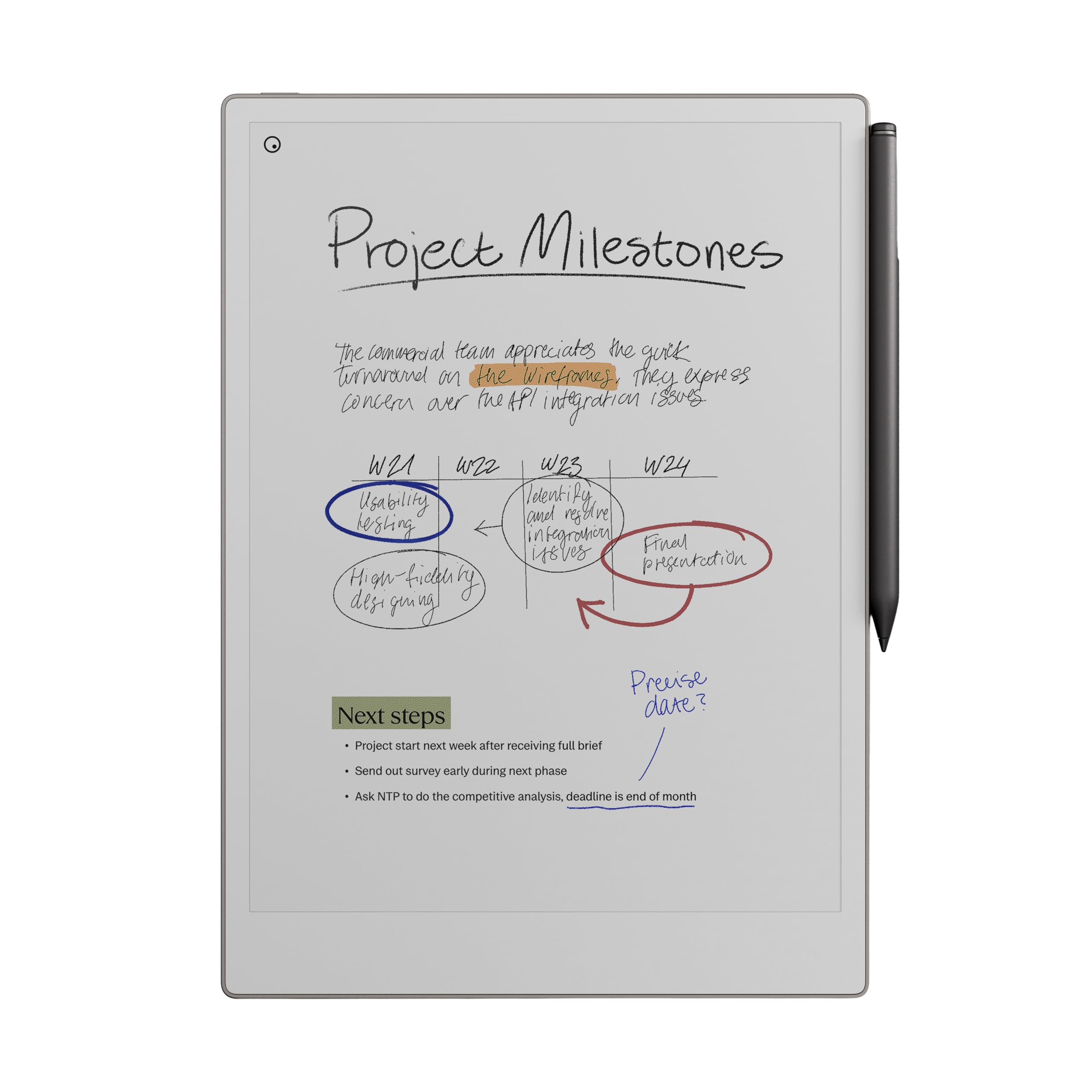
Using the reMarkable Paper Pro felt like switching from a cluttered desk to a clean workspace. The screen has a texture that makes every pen stroke feel natural, and the included Marker Plus works with excellent accuracy. We noticed how quick it was to open notebooks or write over PDFs, making it ideal for organized note-takers.
What stands out most is its simplicity. There are no apps, notifications, or constant pings, so our focus stayed on reading and writing. The color display adds enough contrast for comfortable reading, even outdoors, and the adjustable backlight makes late-night sessions easy on the eyes.
It’s not a multipurpose tablet, and that’s the point. It’s built for writing, sketching, and reviewing documents with minimal distractions. If your goal is to combine the feel of paper with digital organization, the reMarkable Paper Pro is a solid and thoughtful choice.
Onyx Go 7 eReader

We think the Onyx Go 7 is a smart pick for readers who want flexibility, clarity, and a smooth reading experience beyond basic e-readers.
Pros
- Sharp, paper-like display that’s easy on the eyes
- Android system allows wide app support
- Adjustable lighting fits any reading environment
Cons
- Slightly higher cost than simpler eReaders
- Interface can feel busy at first
- Battery life drops with heavy app use
The screen feels crisp and bright, even under sunlight. The 7‑inch E Ink display makes long reading sessions easy, and switching to warm light at night feels natural. Turning pages is quick, and text looks as close to paper as we’ve seen on an electronic device.
We liked how we could install other reading apps like Kindle, Kobo, or Libby without extra steps. This made it easier to pull books or documents from different sources. The Android system opens more options, which is great if we want one device for all reading tasks.
The build feels sturdy but still lightweight in the hand. The buttons give a satisfying click when turning pages. While the menus take a little learning, once we got used to them, navigation was quick. For readers who want freedom and versatility in an eReader, the Onyx Go 7 delivers a complete and practical experience.
PocketBook Basic Lux 4
A solid pick for those who want a simple, travel-friendly e-reader focused only on reading.
Pros
- Feels natural to read with its glare-free matte E Ink screen
- Adjustable frontlight keeps eyes comfortable in day or night
- Lightweight build makes long reading sessions easy
Cons
- Screen seems fragile compared to pricier models
- PDF reading experience isn’t ideal for adjusting text size
- Lacks extra features like Bluetooth or waterproofing
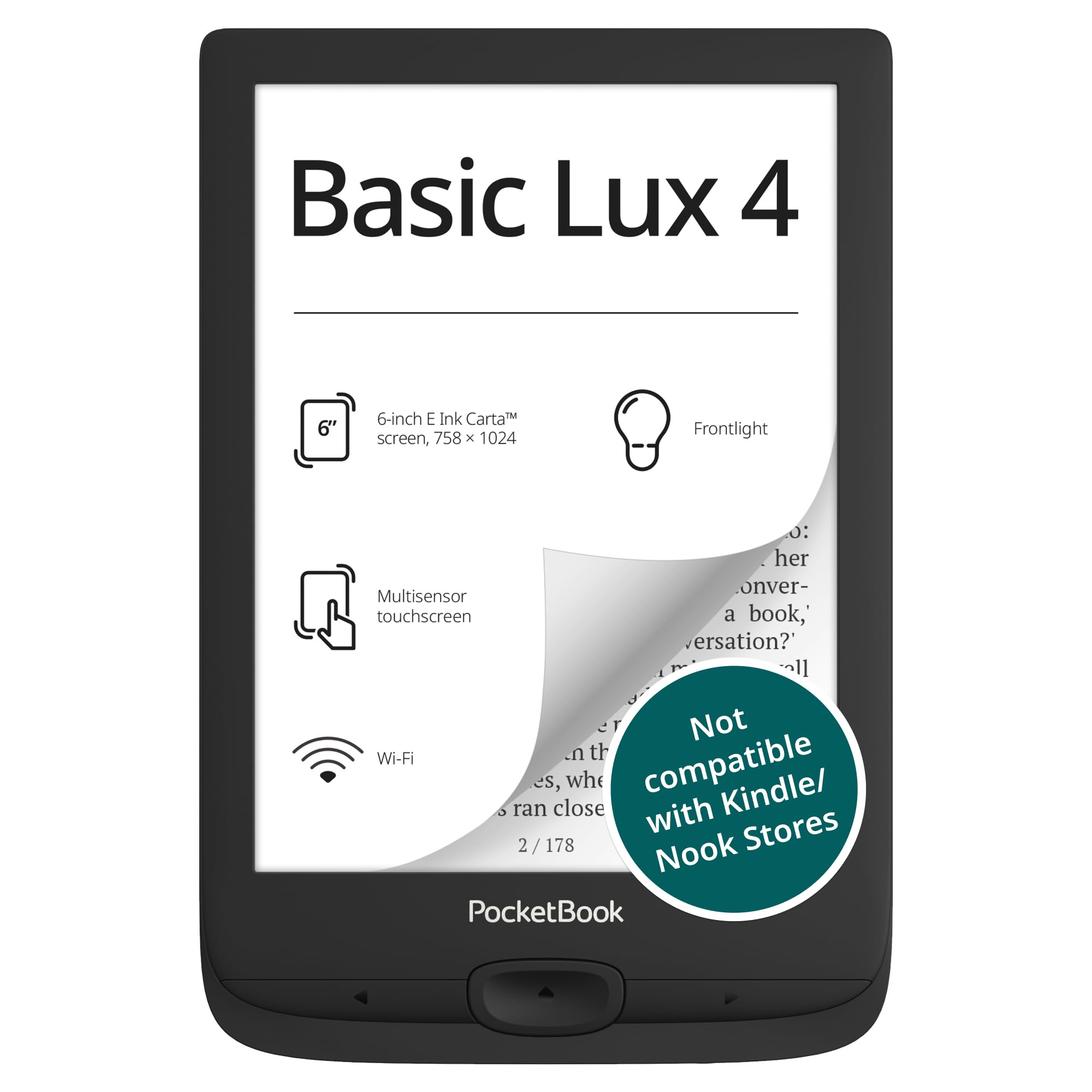
We found the PocketBook Basic Lux 4 reliable when we wanted an e-reader that just works. The E Ink display looks crisp and gentle on our eyes, even under sunlight, and the frontlight adjustment lets us read comfortably in darker rooms.
Carrying it around feels effortless. It’s slim and light enough to hold in one hand for extended reading, which made commuting smoother for us. Switching between EPUB, MOBI, and PDF files worked without a hitch, so we didn’t have to waste time converting formats.
While we appreciated its straightforward design, it does have trade-offs. The screen seems delicate, so using a protective case feels necessary. Those wanting features like waterproofing or Bluetooth audio should look at higher-end options. Still, if we need a dependable reader for an existing ebook library, this PocketBook delivers good value.
Buying Guide
When we shop for an ebook reader, we should start by thinking about how and where we plan to read. If we often read outside, a screen with strong brightness and glare reduction matters. For indoor reading, a lower light setting keeps our eyes comfortable.
Battery life plays a big role. Many ebook readers can last for weeks on one charge, but we still need to check how settings like Wi-Fi or screen lighting affect battery use. A reader that balances power with performance can save us time and frustration.
We should also think about storage. Those who read mostly text-based books may not need much space, but if we like illustrated books or PDFs, larger storage is useful. Some models support expandable memory, which can help us manage a large library.
| Feature | Why It Matters | What to Look For |
|---|---|---|
| Display Quality | Affects readability and comfort | Sharp text, adjustable lighting |
| Battery Life | Determines time between charges | Long-lasting, efficient use |
| Storage | Holds our library | At least 8GB or expandable memory |
| Weight and Size | Impacts portability | Lightweight, fits our hands well |
| Format Support | Works with different file types | Supports standard ebook formats |
Before deciding, we should test how the device feels to hold and how easy it is to turn pages or adjust settings. A comfortable design and responsive interface make reading more enjoyable.
Frequently Asked Questions
We compare display technology, battery performance, and usability across different ebook readers. We also look at reading tools, app options, and device suitability for study and work.
What features should I look for in a top-rated ebook reader?
We should focus on screen clarity, size, and lighting options. Adjustable brightness and warmth help reduce eye strain. Storage capacity, waterproof design, and format support also matter for daily use. Built-in dictionaries and annotation tools add practical value.
How do modern ebook readers enhance the reading experience for avid readers?
Newer ebook readers use E Ink displays that mimic paper, making long reading sessions easier on the eyes. Many include touchscreens, customizable fonts, and lightweight designs. Some allow syncing across devices, so we can continue reading where we left off.
Which ebook readers provide the best battery life and screen quality?
Devices from Amazon Kindle, Kobo, and PocketBook often last several weeks per charge. High-resolution screens with glare-free coatings deliver crisp text even in sunlight. Front lighting systems let us read comfortably both indoors and outdoors.
Are there any ebook readers particularly suitable for academic or professional note-taking?
Models like the Kobo Elipsa and reMarkable include stylus support for writing directly on documents. These devices let us highlight, sketch, and export notes easily. Cloud syncing ensures that our notes are always backed up and accessible.
What are the most recommended ebook reader apps for Android devices?
Popular options include Kindle, Kobo Books, and Libby. Each supports features like adjustable fonts, dark mode, and syncing across devices. We can also try Moon+ Reader or ReadEra for offline reading and broader format support.
What is the difference between an ebook reader and a tablet in terms of reading functionality?
Ebook readers use e-paper screens that reduce glare and consume little power. Tablets, on the other hand, use LCD or OLED screens that deliver color but can cause more eye fatigue. Ebook readers focus on long reading sessions, while tablets support a wider range of apps and activities.