A good gaming keyboard can totally change the way you play—and how your hands feel after hours at your desk. Unlike regular keyboards, gaming ones focus on speed, accuracy, and lasting longer through those marathon sessions.
They usually come with mechanical switches, customizable lighting, and programmable keys, all designed to give you more control.
When you’re picking one, you’ll want to look at the type of switches, overall build, and the layout. Switches change how each press feels and sounds, while build quality decides if your keyboard will survive your rage quits.
The best gaming keyboards find a sweet spot between comfort, performance, and reliability so you can just focus on the game—not the gear.
We tried out a bunch of models, comparing features and just seeing what felt best for gaming and everyday stuff.
Best Gaming Keyboards
We dug into the top gaming keyboards to make it easier to find the right fit for your setup. Our picks focus on performance, build quality, and features that actually make a difference both in-game and for regular typing.
GK GAMAKAY NS68 Keyboard
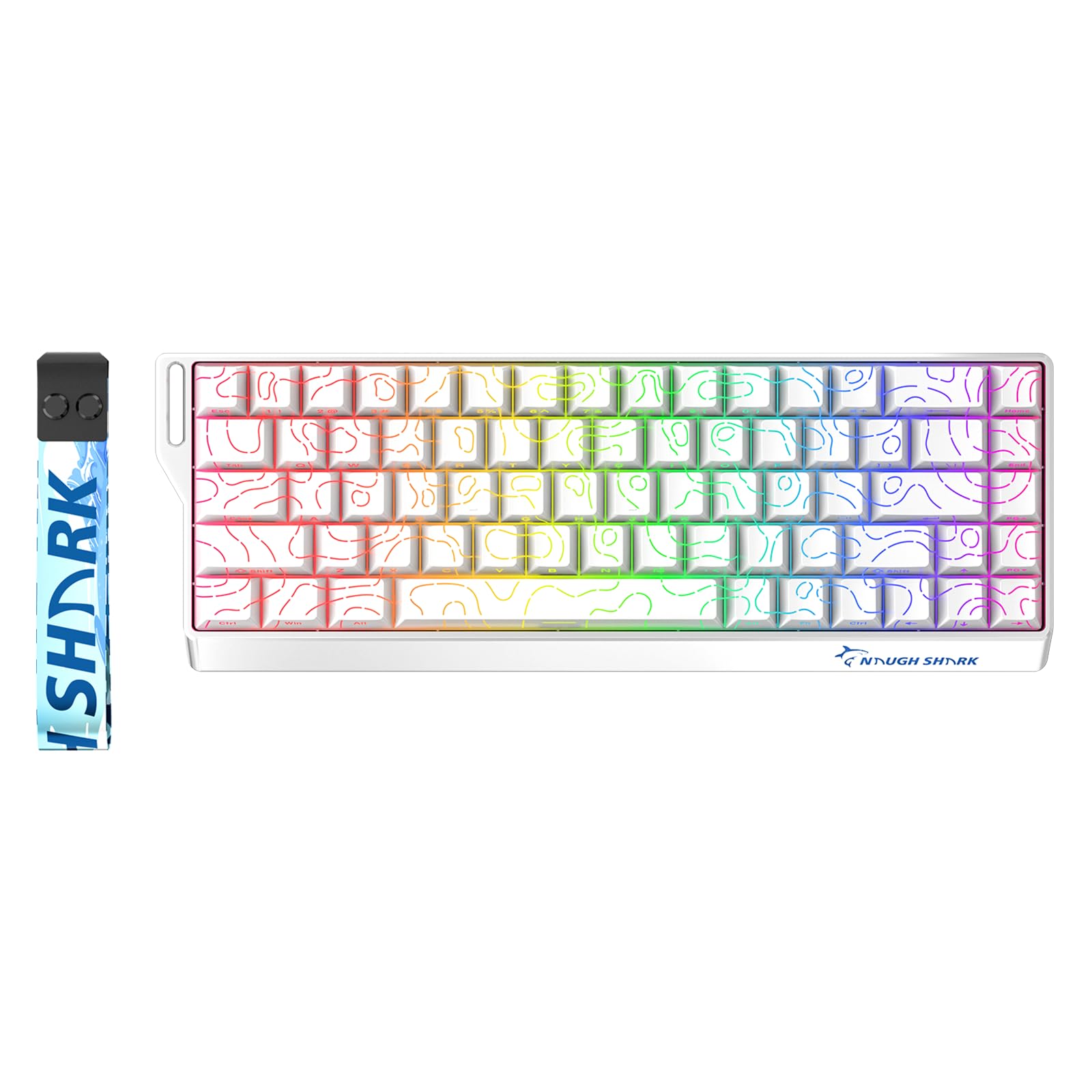
- 【0.01mm Rapid Trigger Accuracy, Zero Dead Zone】With an ultra-precise 0.01mm actuation break, the NaughShark NS68 detects…
- 【0.125ms Low Latency & 8KHz Polling Rate】The NS68 magnetic gaming keyboard has a polling rate of up to 8K Hz and can ach…
- 【Side-Printed, PBT Cherry Profile, Pattern Shine Through Keycaps】With advanced technology, the custom PBT keycaps allow …

If you want fast response times and customization without a huge keyboard crowding your space, this one’s a strong pick.
Pros
- Super quick key response with adjustable actuation
- Compact 65% layout that actually frees up desk space
- Hot-swappable switches—try out different feels, no soldering
Cons
- Advanced features take a bit to learn
- Software setup isn’t exactly plug-and-play
- No dedicated media controls
When we tried the GK GAMAKAY NS68, it just felt snappy. The rapid trigger keys reacted instantly, and we could tweak how sensitive each key was for different games.
Honestly, it gave us more control than most mechanical boards.
The smaller size fit perfectly on a cramped desk, leaving space for a big mousepad. We liked the side-printed keycaps—they still looked sharp after long use.
The RGB lighting popped but didn’t blind us, and you get some cool effects without having to mess with settings forever.
Hot-swappable magnetic switches felt like a game-changer, letting us try different switch types easily. The software’s deep customization took some patience, but once we got it, features like Snap Tap and Dynamic Keystroke really helped in fast games.
Corsair K70 RGB TKL


- Built for Champions: CORSAIR CHAMPION SERIES products are designed for and tested by top esports professionals – helping…
- CORSAIR OPX RGB Optical-Mechanical Keyswitches: Hyper-fast input with 1.0mm actuation distance and smooth linear travel,…
- Powered by CORSAIR AXON Hyper-Processing Technology: CORSAIR’s most advanced gaming keyboard experience processes and tr…
This one’s for gamers who want fast response and a compact board, but don’t want to give up premium features.
Pros
- Sturdy aluminum frame
- Lightning-fast key response
- Compact with a detachable USB-C cable
Cons
- Keys might feel too sensitive for some
- No number pad
- Software takes a while to figure out
The Corsair K70 RGB TKL just feels rock solid out of the box. That aluminum frame means it doesn’t flex, and the PBT keycaps don’t get shiny after hours of use.
It’s not flimsy, and the smaller size lets you move your mouse more freely.
Typing on the OPX switches is almost too fast—they register with barely a touch. That’s awesome for gaming, but we made more typos than usual at first.
After a bit, though, it felt way better for games than for writing essays.
We messed with the iCUE software for a while before it made sense, but once you get it, switching between profiles is easy. The media controls and volume roller actually came in handy a lot more than we expected.
Logitech G713 Gaming Keyboard

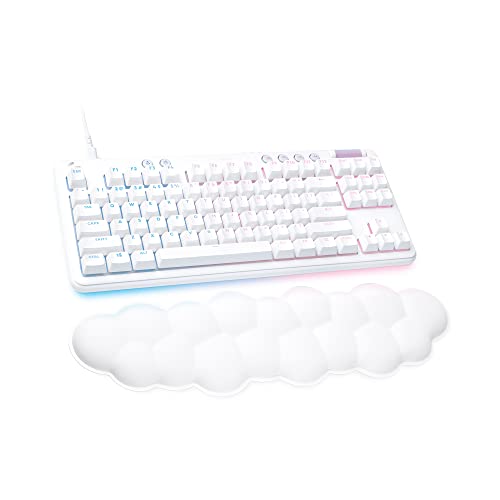
- Cloud-soft Comfort: Float away with G713’s dreamy white design and comfy, cloud-shaped palm rest; compact mechanical TKL…
- Lovely Lighting: Per key and perimeter Logitech LIGHTSYNC RGB with preloaded Play Mood animations, the Aurora Collection…
- Always On: You’re always ready to play, simple and worry-free, with wired USB-C keyboard connectivity
If you want something compact, stylish, and comfy that still performs, this board is worth a look.
Pros
- Wrist rest is super comfortable for long stretches
- RGB lighting is customizable and just looks cool
- Compact design that doesn’t feel cramped
Cons
- Keycaps are proprietary, so not easy to swap out
- Wired-only—wireless fans might be disappointed
- Price is a bit steep for what you get
The G713’s soft palm rest is the first thing you notice. After a few hours, our wrists didn’t ache like usual.
The tenkeyless layout freed up desk space, which made moving the mouse around easier.
The RGB lighting is more than just for show—it’s easy to adjust and can match your mood or setup. Tweaking the effects with Logitech’s G HUB was pretty painless.
We do wish the keycaps were easier to change out. If you want to go wild with custom looks, you’re kinda stuck with Logitech’s own sets.
Also, being wired keeps things reliable, but we know some people really prefer wireless. Still, the G713 felt great to type and game on, so we didn’t mind too much.
ASUS ROG Scope II 96


- 96% layout: Retains all function and number keys in a more compact and efficient layout that frees up desk space
- Hot-swappable switches: Pre-lubed NX Snow linear switches and ROG NX Storm clicky switches with walled stem design to en…
- Tri-mode connection: Connect using Bluetooth (up to three devices), 2.4 GHz with ROG SpeedNova wireless technology or wi…
If you want a compact design but can’t give up a number pad, this keyboard nails it.
Pros
- Keeps the number pad without hogging desk space
- Hot-swappable switches feel smooth and steady
- Wireless connection is fast and reliable
Cons
- Keys sit closer together than on a full-size board
- Heavier than some other wireless options
- Costs more than most budget keyboards
We immediately noticed how much desk space we got back. The 96% layout keeps the number pad but trims the width, so it feels efficient without getting cramped.
It took a bit to adjust, but once we did, both typing and gaming felt natural.
The switches felt solid and smooth. Those pre-lubed NX Snow switches glide nicely, and the stabilizers cut down on rattle—especially on longer keys.
Sound-dampening foam made late-night gaming way less noisy.
Wireless performance impressed us. The 2.4 GHz connection didn’t lag, even in fast games, and the battery lasted for weeks on one charge.
It’s on the heavier side, so it’s not the most portable, but at least it stays put during intense sessions.
SteelSeries Apex Pro TKL Gen 3


- THE WORLD’S FASTEST KEYBOARD — Push the boundaries with cutting-edge OmniPoint 3.0 switches with Rapid Trigger, Protecti…
- OMNIPOINT 3.0 — More than just fast, our newly redesigned Hall Effect Switch have 20x faster actuation and 11x quicker r…
- GAME-READY PRESETS — Gain a competitive edge in your favorite game with just a few clicks using GG QuickSet’s game-ready…
This keyboard just nails it if you want speed, flexibility, and that premium typing feel—whether you’re gaming or just knocking out emails.
Pros
- You can adjust actuation, so it’s easy to fine-tune for different games.
- Rapid Trigger feels snappy and super responsive when things get hectic.
- The build feels sturdy—definitely not flimsy or cheap.
Cons
- The software? Yeah, it’s a bit of a headache to figure out at first.
- Price is definitely on the higher end.
- RGB effects could use more variety—feels a little basic at times.
When I tried the Apex Pro TKL Gen 3, the speed of the keys immediately stood out. Dropping the actuation point made movement in shooters feel instant, but bumping it back up helped for typing sessions.
That level of control just isn’t common. The Rapid Trigger feature really came alive during quick strafes and repeated taps.
Keys reset the moment I lifted my fingers, which shaved off precious milliseconds in fast-paced games. It felt weird for maybe a minute, but then it just clicked.
Typing on this board felt smoother than I expected. The foam dampening and PBT keycaps gave each press a soft but solid vibe.
The metal frame adds some heft, but it never feels clunky. I liked the OLED screen for swapping settings mid-game, though honestly, the software could be a lot simpler.
Buying Guide
If you’re picking out a gaming keyboard, start by thinking about mechanical versus membrane switches. Mechanical switches give you more feedback and they last longer, but membrane ones are quieter and usually cost less.
Size and layout matter, too. Full-size keyboards have a number pad, while tenkeyless or compact models save space—so it’s really about how much desk room you’ve got and what you actually play.
Lighting’s another thing to consider. RGB backlighting lets you play with colors, while single-color lighting keeps things simple and is often cheaper.
Lighting helps in the dark, but honestly, it’s not a must-have for everyone.
Extra features like programmable keys, media controls, or detachable wrist rests can add comfort or convenience. Don’t pay for stuff you’ll never use—just pick what fits your habits.
| Feature | Why It Matters |
|---|---|
| Switch Type | Affects feel, sound, and durability |
| Size/Layout | Impacts desk space and comfort |
| Backlighting | Helps visibility and personalization |
| Extra Features | Adds convenience for specific needs |
Check the build quality before you buy. Keyboards with metal frames or tough plastics last way longer than lighter, cheaper ones.
A solid build means less flex, even when you’re in the middle of a long gaming session.
And of course, there’s price. Higher prices usually get you more features or better materials, but sometimes you just don’t need all the bells and whistles.
It’s all about balancing what you want with what you’re willing to spend.
Frequently Asked Questions
We dig into specific models, pricing, features, and design choices that actually matter for gamers. Here’s what stands out for performance, durability, and value—at least in my experience.
What are the top-rated mechanical keyboards for gaming in 2025?
We’re seeing the SteelSeries Apex Pro TKL (2025 Edition) and the Razer Huntsman V3 Pro get a lot of love this year. Both bring fast optical switches, customizable actuation, and a solid build to the table.
The Logitech G915 TKL (Updated Model) is still a favorite for its low-profile design and reliable wireless.
Which gaming keyboards offer the best value under $100?
The Keychron C3 Pro and the HyperX Alloy Origins Core punch above their weight for the price. Both use mechanical switches and feel sturdy.
If you’re on a tight budget, the Corsair K55 Core is worth a look. It’s got reliable membrane keys and RGB lighting without breaking the bank.
What features should I look for in a high-quality wireless gaming keyboard?
Look for low-latency wireless, a battery that won’t quit on you, and a stable connection. Hot-swappable switches, durable keycaps, and onboard macro memory are all big pluses.
Can you recommend a durable and responsive keyboard for professional gaming?
I’d go with the Wooting 60HE+. Its analog switches give you precise control, and it’s compact and built to last.
The Razer Huntsman V3 Pro is another good pick, thanks to those optical switches and the tough aluminum frame.
What are the latest advancements in gaming keyboard technology?
We’re seeing more magnetic or analog switches, so you can tweak actuation points just how you like. Wireless protocols keep getting better, battery life is up, and the software lets you customize pretty much everything now.
How do I choose between a membrane and a mechanical gaming keyboard?
Membrane keyboards cost less. They also run quieter, which some people really appreciate.
But they wear out pretty fast.
Mechanical keyboards last longer. They feel more consistent with every press.
You also get to pick from different switch types, depending on how you like to play.