
Keeping your CPU cool is one of the most important parts of maintaining a stable and fast computer. The best Liquid CPU cooler move heat away from your processor more efficiently than traditional air coolers, which helps prevent overheating and performance drops. They also tend to run quieter, making them a good choice for people who want both strong cooling and low noise.
When choosing the best liquid cooler, the key things to look at are radiator size, pump quality, fan noise, and compatibility with your PC case and CPU socket. A poorly matched cooler can lead to installation issues or weak cooling performance. The best liquid cooler balances cooling power, noise level, and ease of installation for your specific system.
We spent hours comparing and testing top models to find the best liquid coolers of 2025 that deliver reliable performance and value.
Best Liquid Coolers 2025 | Best CPU Coolers 2025
We reviewed the latest liquid and CPU coolers to find the top performers for 2025. Our picks balance cooling efficiency, noise control, and easy installation to help keep your system running smoothly. Below is our list of the best options available this year.
ID-COOLING FX360 INF 360mm AIO


- 【Premium AIO Cooler】A premium CPU liquid cooler features a 360mm radiator and 3 quiet fans for gaming and high-performan…
- 【Powerful Pump】Equipped with the latest GEN 7 pump running at 2900RPM±10% which can dissipate the heat from CPU efficien…
- 【Upgraded Radiator】Having 12 waterways and a high-density stack of fins, its 27mm thick radiator cooling surface has bee…

We recommend this cooler for builders who want strong thermal control, simple installation, and quiet operation at a fair price.
Pros
- Excellent cooling even under heavy CPU load
- Easy to install with tidy cable management
- Quiet fans with smooth performance
Cons
- Fans can vibrate slightly at higher speeds
- RGB lighting may be too bright for some setups
- Pump cables feel a bit short for large cases
We recently installed the FX360 INF in one of our test rigs, and it impressed us right away. The cooler handled an Intel i9 chip without breaking a sweat, keeping temperatures steady during long gaming sessions. The pump ran quietly, and the fans barely made a sound even when the CPU was under pressure.
Setup was straightforward. The daisy-chained fans helped reduce clutter, and the mounting hardware fit snugly on both Intel and AMD sockets. We appreciated how the radiator design felt solid yet lightweight, making it easy to position inside a mid-tower case.
The infinity mirror lighting gives the build a clean, modern look without being too flashy. We did notice a faint vibration from the fans at maximum speed, but it was minor and didn’t affect performance. Overall, this cooler strikes a good balance between efficiency, noise, and design, making it a dependable choice for 2025 builds.
Thermalright Grand Vision 360 ARGB Black
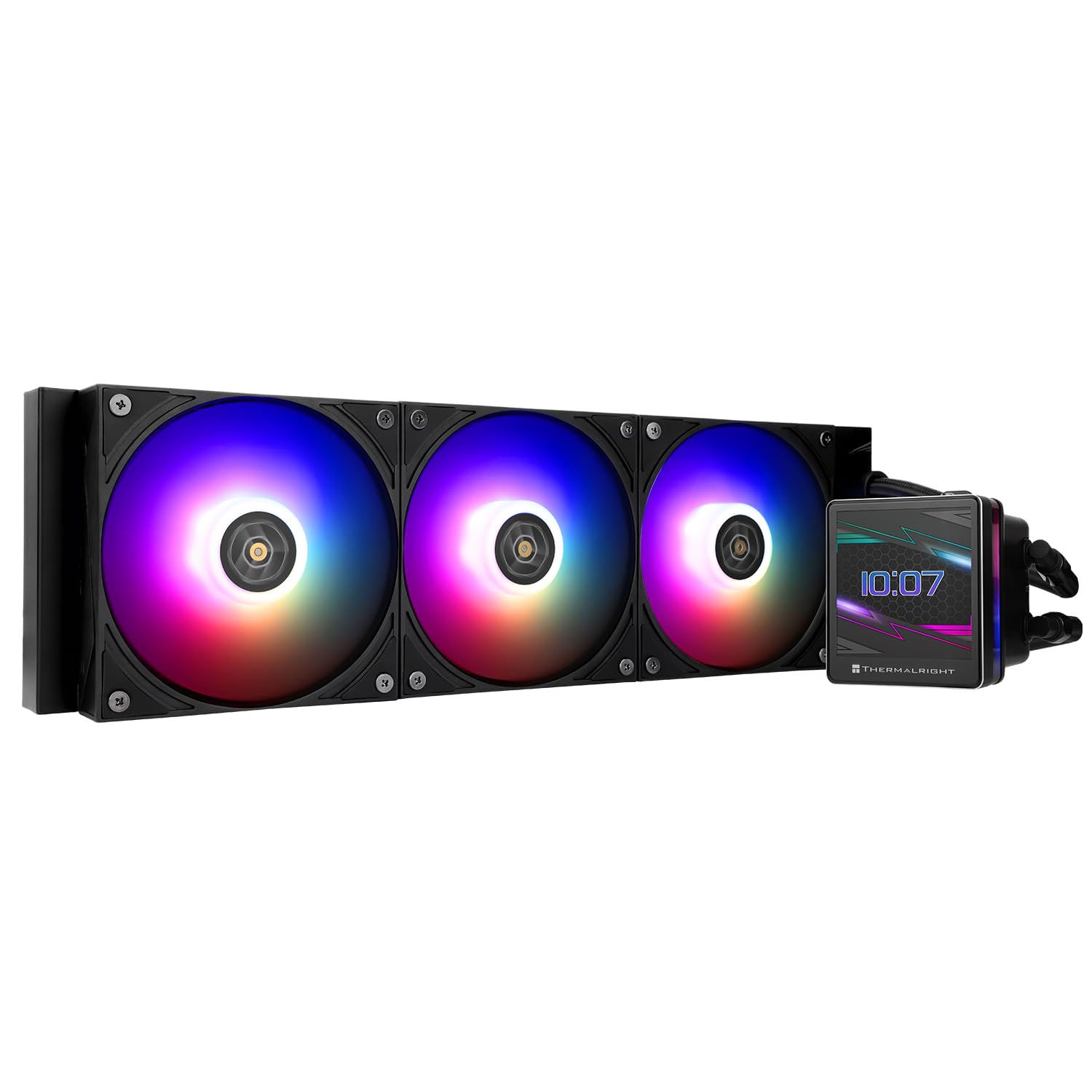

- [High Cooling Combination] The CPU water cooling radiator adopts a water block with a detachable magnetic LCD screen + a…
- [3.4 Inch LCD Screen] The display of the radiator is different from the round screen display, IPS LCD square screen, whi…
- [Stable Bearing] The fan adopts STABLY-FDB V2 bearing (abbreviation: S-FDBV2 bearing), which can solve the problem of fa…
We recommend this cooler for users who want strong thermal performance with a modern LCD display at a fair price.
Pros
- Excellent cooling under heavy load
- Sharp and customizable LCD display
- Simple installation for most CPU platforms
Cons
- Software feels unfinished and clunky
- Fan hum noticeable at low speeds
- Tube orientation can limit mounting options
When we installed the Thermalright Grand Vision 360 ARGB Black, the setup went smoothly. The mounting hardware fit our AM5 board without issue, and the included instructions were clear enough to follow. Once powered on, the LCD display immediately stood out with crisp colors and easy-to-read system info.
During testing, the cooler handled high CPU loads with ease. Temperatures stayed low even after long gaming sessions, and the fans ramped up smoothly without sudden noise spikes. Adjusting the fan curve helped reduce the low-speed hum that some users mention.
The software, however, could use improvement. It works for basic display customization, but the interface feels dated and lacks polish. Despite that, we appreciate the wide compatibility and solid build quality. For those who value both performance and aesthetics, this AIO is a practical choice for 2025 builds.
Lian Li GA II Trinity SL-INF 360MM


- The pump cap has three interchangeable designs, each with a unique look and two rings of colors that can be individually…
- The 27mm thick radiator provides significant thermal performance.
- The 45-degree tubing connector allows for 360° tube rotation, while the uniquely designed mounting backplates and compat…
This cooler suits builders who want strong thermal control, quiet fans, and customizable lighting without a difficult setup.
Pros
- Simple to install with flexible tubing and clear mounting hardware
- Runs quietly even when the CPU is under heavy load
- Clean, customizable RGB lighting adds style without being distracting
Cons
- Pump lighting can be inconsistent on some units
- Radiator thickness may limit case compatibility
- Costs more than basic AIO options
We found the Lian Li GA II Trinity SL-INF 360MM easy to mount thanks to its smart backplate design and rotating tubing. The flexible connectors made routing simple, and the whole process took less time than most other 360mm coolers we’ve used.
Once running, it handled heat from a high-end CPU with no trouble. The fans stayed quiet, and the temperatures remained steady even during long gaming sessions. The larger copper plate and wider tubing seemed to help move heat efficiently.
We liked the lighting control on the pump cap, which allowed us to switch between different looks without extra software. However, it’s worth noting that a few users have reported lighting issues, so quality control may vary. Overall, this model feels well-built and performs like a premium cooler for those who value both looks and function.
ARCTIC Liquid Freezer III Pro 420 A-RGB


- CONTACT FRAME FOR INTEL LGA1851 | LGA1700: Optimized contact pressure distribution for longer CPU life and better heat d…
- ARCTIC’s P14 PRO FAN: More power at any speed – more powerful and quieter than the P14, especially at low speeds. Higher…
- NATIVE OFFSET MOUNTING FOR INTEL AND AMD: Shifting the cold plate center towards the CPU hotspot ensures more efficient …
This cooler is a strong choice for anyone who wants quiet, efficient cooling and doesn’t mind checking case compatibility first.
Pros
- Excellent cooling with low noise
- Clean cable management design
- Built-in VRM fan improves stability
Cons
- Large size limits case options
- Installation can feel tight in some setups
- Some users report packaging issues
We installed the Liquid Freezer III Pro 420 on a high-end desktop, and the first thing we noticed was how quietly it ran. The three 140 mm fans moved a lot of air without sounding harsh, even under heavy CPU load. The contact pressure felt even and firm, which helped keep temperatures low during long stress tests.
Cable management stood out right away. The integrated fan cables made the build look tidy, and connecting everything took less time than usual. The added VRM fan gave a small but useful drop in motherboard temps, which helped maintain consistent performance.
Size is the main consideration here. The 420 mm radiator is large, so we had to double-check clearance before installation. Once mounted, though, the cooler looked clean and professional. For builders with enough space, this AIO delivers reliable cooling and quiet operation that’s hard to fault.
Corsair iCUE Link H150i LCD Liquid CPU Cooler


- Seamless Personalization: Enjoy powerful, low-noise cooling with a personalized LCD screen, all with simplified hidden c…
- Brilliant IPS LCD Display: Showcase your real-time CPU temperature, favorite animated GIF, funniest meme, or your team’s…
- Effortless Connectivity & Intelligent Design: Take your build to the next level with the patent-pending iCUE LINK ecosys…
We recommend this cooler for anyone who wants powerful cooling performance with a clean, modern look and easy setup.
Pros
- Strong cooling keeps CPU temps low even under load
- LCD screen adds personality and useful system info
- Cable management is simple with the iCUE Link hub
Cons
- iCUE software can feel inconsistent
- The price is higher than many other 360mm coolers
- LCD setup takes extra time during installation
We recently installed this cooler in one of our test builds, and the process felt smoother than expected. The pre-applied thermal paste saved time, and the hidden cable design made the setup look tidy. Once powered on, the RGB fans lit up evenly without being too bright.
The 2.1-inch LCD screen stood out right away. We used it to show CPU temps and later switched to a small animation. It’s bright, crisp, and easy to read from different angles. This small screen adds a nice personal touch that makes the system feel more advanced.
During stress tests, the cooler handled heat well. Fan noise stayed low even when the CPU ran at full load. The iCUE software gave us full control over lighting and fan curves, though it took a few tries to get everything working perfectly. Overall, the Corsair iCUE Link H150i LCD delivers strong cooling, clean design, and a premium experience that suits both performance-focused and style-conscious builds.
Buying Guide
When we choose a liquid CPU cooler, we first look at compatibility. The cooler must fit our CPU socket and case size. Checking radiator dimensions helps avoid clearance issues with RAM or GPU.
We also consider cooling performance. Larger radiators and higher-quality fans often move more heat away from the CPU. However, more fans can mean more noise, so we balance performance with sound levels.
Ease of installation matters too. Some coolers come with pre-applied thermal paste or simple mounting systems. We prefer designs that reduce setup time and lower the chance of mistakes.
| Feature | Why It Matters | What To Check |
|---|---|---|
| Radiator Size | Affects cooling capacity | 120mm, 240mm, 360mm |
| Fan Speed | Impacts airflow and noise | Measured in RPM |
| Noise Level | Affects comfort and acoustics | Below 35 dBA is quiet |
| Pump Quality | Ensures long-term reliability | Look for durable bearings |
| Warranty | Protects our investment | At least 2–5 years |
We also look at build quality and materials. Strong tubing and leak-resistant fittings help prevent damage. A sturdy pump housing improves durability over time.
Aesthetics can matter if we use a case with a window. RGB lighting and color options let us match our system’s style, but they should not come at the cost of performance.
Frequently Asked Questions
We’ve seen major improvements in liquid cooling this year, including quieter pump designs, better radiator materials, and wider CPU socket support. Many brands now focus on durability, easy installation, and reliable customer support to meet both gaming and professional performance needs.
What are the top-performing liquid CPU coolers on the market in 2025?
We find the Corsair iCUE H150i Elite LCD XT, NZXT Kraken Elite 360, and Arctic Liquid Freezer III 360 among the top performers. These models deliver strong thermal performance, efficient heat dissipation, and consistent results under heavy CPU loads.
How do the best liquid coolers of 2025 compare in terms of noise levels and cooling efficiency?
Most high-end coolers now maintain temperatures under 70°C for high-end CPUs while keeping fan noise below 30 dBA. Improved pump designs and optimized fan blades help balance cooling power with quiet operation.
Which liquid coolers offer the best compatibility with a wide range of CPU sockets?
We see broad compatibility from major brands like Corsair, Cooler Master, and DeepCool. Their latest models support Intel LGA 1700 and AMD AM5 sockets, with mounting kits included for older platforms.
What advancements in liquid cooling technology have been made in 2025?
Manufacturers introduced AI-based fan control, low-evaporation tubing, and integrated leak sensors. These updates improve system safety, extend lifespan, and help maintain consistent performance over time.
Are there any new or emerging brands in 2025 that are competing with established cooler manufacturers?
A few new companies, such as ThermalFlow and AquaEdge, have entered the market. They focus on affordable yet high-quality all-in-one coolers that challenge larger brands in both design and performance.
What are the warranty and customer service options for the leading liquid coolers in 2025?
Most top brands offer 5 to 6-year warranties, with support through online chat and regional service centers. Companies like Corsair and NZXT provide quick replacement programs for verified hardware defects.



