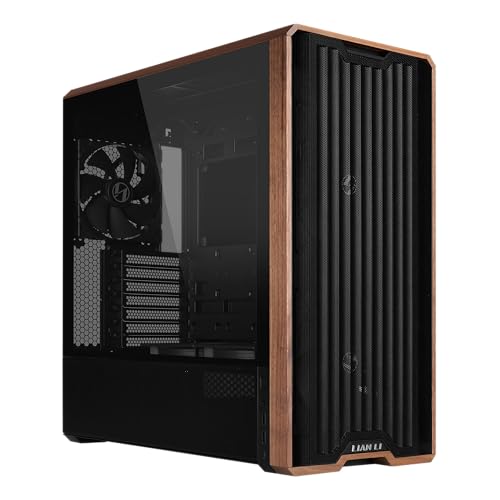
A mid tower case hits a sweet spot for most PC builds. There’s enough space for standard components, but it doesn’t swallow your desk or floor. That’s probably why both first-timers and seasoned builders tend to reach for this form factor—it’s tidy, not overwhelming, and just works for clean setups.
When you’re picking a mid tower case, size and airflow are the big ones. Make sure your motherboard, graphics card, and cooler all fit without a squeeze. Good cable management, solid materials, and a bit of noise control can make the whole build feel smoother and help your system run better in the long haul. The best mid tower case nails airflow, build quality, and space efficiency—so your PC ends up reliable and neat.
We spent a lot of time comparing and hands-on testing different mid tower cases to figure out which ones actually make building and keeping a PC headache-free.
Best Mid Tower Cases
We dug into a bunch of mid tower cases to find the ones that really balance space, airflow, and build quality. Here’s our full list of top picks for reliable, efficient PC builds.
NZXT H5 Flow 2024


- EXCEPTIONAL GPU COOLING-The PSU shroud is perforated on the side and bottom, enabling optimal air intake from two 120mm …
- LARGE RADIATOR SUPPORT-Supports up to a 360mm radiator in front and a 240mm radiator up top for powerful liquid cooling …
- HIGH-PERFORMANCE AIRFLOW-Ultra-fine mesh on the top, front, and side panels creates maximum airflow and filters dust.

This is a solid pick if you want good airflow, clean looks, and fuss-free cable management—without forking over a fortune.
Pros
- Airflow is excellent; keeps things cool
- Cable routing and hiding is easy
- Modern, simple style fits almost any setup
Cons
- Only comes with two fans
- Front fan setup limits some layouts
- Mesh bottom can show PSU cables if you use bright lights
We found the NZXT H5 Flow 2024 a breeze to build in. The case feels sturdy, and the tempered glass panel slides off without any fuss. Once everything was installed, airflow really stood out—temps stayed low even when we pushed the system.
Cable management is a highlight here. Wide channels and built-in straps make it straightforward to keep things neat. We liked how the design hides wires but still leaves room for future upgrades.
The two included fans do alright, but adding a couple more helps even things out. The perforated PSU shroud can show off some cables if you like RGB lighting. Still, the overall experience was positive, and the size works well for most desks.
Lian Li Lancool 216 RGB Mid Tower Case


- LANCOOL 216 PC case – Aesthetic looks, airflow focus, easy installation, and ample room for large GPU and cable manageme…
- Computer Case Focus on Cooling. The modular motherboard I/O allow you to move the motherboard to a higher/lower position…
- Easy Build Gaming PC Case. This case have a lot of flexibilities convenient for components installations: Removeable top…
If you want strong airflow, reliable build quality, and easy cable management without breaking the bank, this one’s a good bet.
Pros
- Big pre-installed fans move a lot of air
- Steel frame and glass panel feel tough
- Smart interior makes cable routing easy
Cons
- Front RGB fans can be a bit much if you prefer subtle lighting
- Not much room up top for thick radiators
- Heavier than some other mid towers
When we put together our system in the Lancool 216, airflow jumped out as a real strength. The two 160 mm front fans pulled in plenty of air, so our CPU and GPU stayed cool even under heavy use. Fine mesh panels kept the air moving without adding noise.
The inside layout made assembly painless. Removable top bracket and cable clips saved us time. The frame feels solid, and the glass side panel gave the build a nice, finished look.
Cable management was a breeze. Velcro straps and a side grommet bar kept everything under control. Lian Li clearly designed this case for both performance and convenience. If you’re planning a gaming or workstation build, the Lancool 216 RGB brings a strong mix of cooling, quality, and usability.
NZXT H6 Flow RGB Mid-Tower Case


- Wraparound glass panels with a seamless edge provides an unobstructed view of the inside to highlight key components.
- Compact dual-chamber design improves overall thermal performance and creates a clean, uncrowded aesthetic.
- Includes three pre-installed 120mm RGB fans positioned at an ideal angle for optimal out-of-the-box cooling and vibrant …
This one’s for folks who want a modern look, solid airflow, and cable management that doesn’t make you sweat.
Pros
- Angled RGB fans give great airflow
- Dual-chamber hides cables well
- Panoramic glass looks premium
Cons
- Some screws are stubborn during assembly
- Glass panels pick up fingerprints fast
- Not much room for extra-large GPUs
The build process felt smooth. Wide cable channels and straps made it easy to keep things tidy, and the dual-chamber layout hid the power supply and cables. The end result looked clean with little effort.
Airflow was impressive out of the box. Three pre-installed RGB fans moved air efficiently, keeping temps steady through long gaming sessions. The angled fans really did help with cooling—no extra tinkering needed.
The wraparound glass panels made the system pop on the desk, though yeah, you’ll probably be wiping off smudges here and there. All in all, the NZXT H6 Flow RGB delivers on design, airflow, and build comfort for most PC builders.
Corsair 4000D Airflow Mid-Tower Case


- Fitting Choice: Combining innovative cable management, concentrated airflow, and proven CORSAIR build quality, choose th…
- Express Yourself: Make your PC a reflection of your personality with a stylish front teak case panel, so your gaming PC …
- CORSAIR RapidRoute Cable Management System: Makes it simple and fast to route your major cables through a single channel…
If you want a clean setup, strong airflow, and a refined look, this case is worth a look.
Pros
- Airflow keeps hardware cool
- Cable management is straightforward
- Sleek teak front panel looks sharp
Cons
- Top fan space is a bit tight
- A little bulky for small desks
- Only includes two fans
Building in the Corsair 4000D Airflow felt easy from the start. The RapidRoute cable system kept wiring simple, and the extra space behind the motherboard helped keep things neat. Airflow design kept our CPU and GPU at good temps, even when things got busy.
The teak front panel added a warm, stylish vibe that worked well with our workspace. The tempered glass side panel showed off the build without glare. We liked that the case balanced looks and practicality—nothing unnecessary.
The top section doesn’t have a ton of space for big fans or radiators, so plan ahead. Still, the overall experience felt solid and well-designed. If you want a mid-tower that’s easy to build in and just works, the Corsair 4000D Airflow is a strong choice.
NZXT H7 Flow 2024


- DEDICATED GPU COOLING — Supports three bottom-mounted 120mm fans for direct GPU cooling while retaining a narrow mid-tow…
- OUT-OF-THE-BOX PERFORMANCE — Comes equipped with three front-mounted 120mm fans for exceptional out-of-the-box cooling.
- OPTIMIZED FOR AIRFLOW — High-performance mesh panels maximize airflow for both intake and exhaust, as well as filter dus…
If you’re after strong airflow, a tidy look, and hassle-free cable management in a mid-tower case, the NZXT H7 Flow 2024 is a solid choice.
Pros
- Airflow is excellent and keeps temps down—even when you’re pushing the system
- Cable routing is straightforward and makes the build look sharp
- Panels pop off easily, so upgrades or tweaks don’t turn into a headache
Cons
- No rear exhaust fan out of the box
- Front USB header cables feel a little flimsy
- No built-in fan or RGB controller
Honestly, we found the NZXT H7 Flow 2024 easy to work with right from unboxing. That mesh front and the included fans move a lot of air; temps stayed noticeably lower compared to some other cases we’ve dealt with. The white finish looks crisp and slides right into a clean, minimalist setup—if that’s your thing.
Cable management? Super smooth. The wide channels and included straps meant we didn’t have to wrestle with wires just to get a clean interior. Snapping off the top and front panels sped up installing the radiator and GPU. It just made the whole build less of a chore.
Now, the airflow is great, but you’ll probably want to pick up a rear fan for balanced cooling. And yeah, those front I/O cables could be a bit sturdier. Still, for what it costs and how it performs, the H7 Flow 2024 nails the balance of function and style for most modern builds.
Buying Guide
When we’re picking a mid tower case, size, airflow, and build quality jump out as the big ones. They shape how easy it is to put things together and how cool your rig runs.
First things first—compatibility. Make sure your motherboard, GPU, and cooler actually fit. Most mid towers take ATX, but some play nice with Micro-ATX or Mini-ITX too.
Airflow and cooling are huge for performance. Mesh panels and lots of fan spots? Yes please. More vents mean less heat hanging around.
Build materials—steel and tempered glass are everywhere. Steel brings sturdiness, glass lets you show off your parts (or your cable mess, if you’re not careful).
Don’t forget about cable management. Good routing keeps air moving and makes your life easier if you ever swap hardware.
| Feature | What to Look For | Why It Matters |
|---|---|---|
| Size & Compatibility | Room for motherboard, GPU, and cooling | Everything needs to fit—no exceptions |
| Airflow | Mesh panels, fan spots, dust filters | Helps your system stay cool |
| Build Quality | Steel or tempered glass | Makes the case last |
| Cable Management | Routing holes, tie-downs | Less clutter, better airflow |
| Expansion Options | Drive bays, PCI slots | Gives you upgrade options later |
A good mid tower case should juggle space, airflow, and style. Go with something that fits your setup now but leaves a little wiggle room for upgrades down the road.
Frequently Asked Questions
We tend to focus on the practical stuff—airflow, cooling support, sturdiness, and cable management. Compatibility with different motherboard sizes and water cooling setups matters too, especially if you’re planning to reuse parts or go custom down the line.
What features should I look for in a high-quality mid tower case?
We want a sturdy frame, smart airflow design, and enough space for all your gear. Tool-less bays, dust filters, and cable routing holes make life so much easier. Front I/O with USB-C and audio jacks? That’s just convenient.
How does airflow impact the performance of mid tower cases?
Airflow is pretty much everything for temps. Well-placed intake and exhaust fans keep things cool when the system’s under stress. Mesh panels and plenty of fan mounts make a real difference in ventilation—it’s one of those things you really notice over time.
Can you recommend mid tower cases that are compatible with water cooling systems?
Look for cases with radiator mounts on the top, front, or rear. The Fractal Design Meshify 2, Corsair 4000D Airflow, and NZXT H510 Flow all support various radiator sizes. These cases make installing custom or all-in-one water cooling setups way less intimidating.
What are the best mid tower cases for cable management?
Wide cable channels, tie-downs, and PSU shrouds make routing cables a breeze. The Corsair 5000D, Lian Li Lancool 216, and NZXT H7 Flow all give you plenty of space behind the motherboard tray for keeping things tidy.
Are there any mid tower cases that support both ATX and microATX motherboards?
Yep, most newer mid towers handle both ATX and microATX. The Phanteks Eclipse G360A and Cooler Master MasterBox TD500 Mesh both fit those sizes without a fuss. It’s handy if you’re upgrading or just want to keep your options open.
What are the most durable materials for mid tower cases?
Steel and aluminum really stand out when it comes to sturdy case frames. Tempered glass panels? They look great and surprisingly hold up well, too—visibility without much worry about breaking. I’d steer clear of those flimsy plastic panels, though; they tend to flex and, honestly, might crack before you know it.