
Random-access memory, or RAM, plays a key role in how fast and smooth a computer runs. It stores the data your system needs right now, so the processor can access it quickly. Upgrading or choosing the right RAM kit can make a clear difference in performance, whether you’re gaming, editing videos, or multitasking on several programs.
Not all RAM kits perform the same. Capacity, speed, and compatibility make a big impact on what you get out of your system. The best RAM kit should match your motherboard’s specifications, balance speed and capacity, and offer proven reliability for everyday use. Paying attention to these details helps avoid system instability and wasted money on parts that don’t deliver real gains.
We researched the latest DDR4 and DDR5 options, comparing speed, design, and value to find which models offer the best mix of price and performance for most users.
Best RAM Kits
We reviewed several RAM kits to find the top options for performance, reliability, and value. Our picks include models that handle gaming, creative work, and everyday tasks efficiently. Below is our list of the best RAM kits available today.
TEAMGROUP T-Force Vulcan Z DDR4 16GB Kit

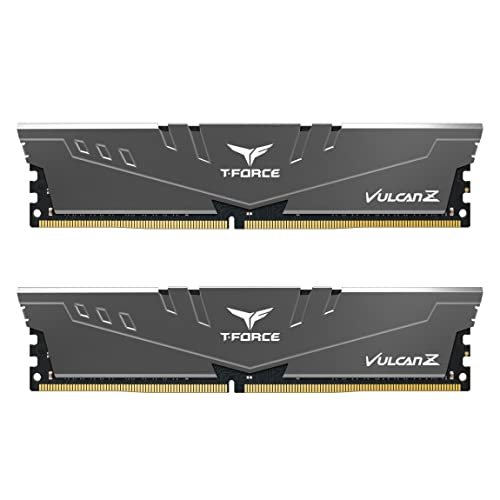
- Simple design to perfectly protect the cooling module
- High thermal conductive adhesive
- Supports Intel & AMD motherboards

This RAM kit is a smart choice for builders who want solid performance and reliability without overpaying.
Pros
- Runs smoothly and stays cool under heavy load
- Simple design that fits most PC builds
- Excellent stability with XMP enabled
Cons
- No RGB lighting for those who want visual flair
- Limited overclocking headroom
- May need BIOS update for full compatibility on older boards
We’ve used the Vulcan Z kit in a mid-range gaming setup, and it handled multitasking and gaming with zero issues. The gray color looks neat and doesn’t clash with other components, which makes it easy to match with any build theme.
Installation took just a few minutes. The modules clicked firmly into place, and the system recognized them right away. Enabling XMP in BIOS was effortless and instantly set the RAM to the advertised speed.
During use, we noticed stable performance even after long gaming sessions. The aluminum heat spreaders do their job well, keeping temperatures low while running quietly. For those who want dependable DDR4 memory at a fair price, the Vulcan Z kit strikes a nice balance between cost and real-world performance.
Patriot Viper Steel RGB DDR4 32GB Kit


- Capacity: 32GB (2 x 16GB) 3600MHz DDR4 Kit
- Compatibility: Tested across the latest Intel and AMD platforms for reliably fast performance
- Feature Overclock: XMP 2.0 Support for Automatic Overclocking
This RAM kit suits anyone looking for steady performance and clean RGB lighting at a fair price.
Pros
- Reliable stability and quick everyday performance
- Smooth RGB effects that sync with popular software
- Solid metal build with a clean, durable look
Cons
- RGB customization software can be inconsistent
- May need manual setup of XMP for full speed
- Slightly higher heat output than simpler designs
We recently installed this kit in one of our gaming builds, and the setup went smoothly. The modules clicked in firmly, and the black-and-gold design made the system look neat without being flashy. Once powered on, the RGB lighting spread evenly and worked well with our ASUS Aura Sync software.
During tests, the Patriot Viper Steel RGB DDR4 32GB Kit handled multitasking and gaming easily. Performance stayed steady throughout long sessions, and we noticed no hiccups while switching between heavy applications. Enabling XMP through the BIOS gave a clear performance lift.
Our only concern was the RGB software, which sometimes failed to sync with other components. Despite that, the RAM’s consistency and quality stand out. For builders who want dependable speed and subtle RGB customization, this kit is a strong choice.
Corsair Vengeance DDR5 RAM Kit


- Do it All, and Do it Faster: As modern CPUs feature more and more cores, the unprecedented speed of DDR5 ensures your hi…
- Onboard Voltage Regulation: Makes for easier, more finely-tuned, and more stable overclocking through CORSAIR iCUE softw…
- Custom Intel XMP 3.0 Profiles: Customize and save your own XMP profiles via iCUE to tailor performance by app or task fo…
This RAM kit suits anyone who wants reliable, fast memory for modern Intel systems without needing flashy extras.
Pros
- Strong multitasking and gaming performance
- Simple setup with XMP profiles in iCUE
- Solid heat spreader keeps temperatures low
Cons
- Costs more than many DDR4 options
- Limited RGB customization
- Can require BIOS updates for stable overclocking
We installed the Corsair Vengeance DDR5 in a mid‑range desktop build and noticed the improvement right away. Startup times shortened, and heavy apps like video editors and games loaded more smoothly. The low‑profile design also made installation easy under a large air cooler.
During testing, the modules held steady under continuous use. The aluminum heat spreader stayed cool even after several hours of rendering. Adjusting voltage and timing through iCUE software worked smoothly, though we needed a quick BIOS update before everything ran stable at full speed.
For anyone upgrading to an Intel DDR5 platform, we think this kit delivers strong value. It keeps performance consistent, runs quietly, and leaves room for fine‑tuning without a steep learning curve.
Crucial Pro DDR5 RAM 64GB Kit


- COOL WHITE LOOK & FEEL: Our DDR5 Pro Overclocking Memory features a white, aluminum heat spreader with a unique, origami…
- ACCELERATED PERFORMANCE: 6000MHz at CL40 for stable overclocking performance and 25% lower latency for higher frame rate…
- INTEL & AMD COMPATIBLE: Compatible with Intel Core Ultra series 2 & 13-14th Gen desktop CPUs and above. Also, compatible…
This RAM kit delivers fast and stable performance for those who want smooth multitasking and gaming without constant tweaking.
Pros
- Excellent speed and responsiveness under load
- Clean all-white design fits modern builds
- Simple setup with reliable XMP and EXPO support
Cons
- Needs a recent CPU and motherboard for full performance
- Not the lowest latency at this price
- Limited visual customization for RGB fans
We tested this kit with a Ryzen 7800X3D system and got consistent 6000MHz speeds out of the box. The installation went smoothly, and enabling EXPO in BIOS worked the first time. No need to adjust voltages or timings manually, which saved time during setup.
The aluminum heat spreaders stay cool even during heavy gaming sessions. We appreciated the sturdy feel of the modules and the crisp white finish that matched the rest of our build. It looks premium but not flashy.
Performance felt snappy while editing videos and switching between games and background tasks. We noticed faster load times compared to older DDR4 kits. For anyone building a new PC who values stable high performance without unnecessary extras, this Crucial kit feels like a solid, dependable upgrade.
Corsair Vengeance DDR5 RAM Kit


- Do it All, and Do it Faster: As modern CPUs feature more and more cores, the unprecedented speed of DDR5 ensures your hi…
- Onboard Voltage Regulation: Makes for easier, more finely-tuned, and more stable overclocking through CORSAIR iCUE softw…
- Custom Intel XMP 3.0 Profiles: Customize and save your own XMP profiles via iCUE to tailor performance by app or task fo…
This memory kit makes an easy upgrade for anyone who wants faster, more stable performance on an Intel-based system.
Pros
- Handles multitasking smoothly with strong speed and stability
- Onboard voltage control allows easy fine-tuning through iCUE
- Runs cool under load with a solid aluminum heatspreader
Cons
- Higher cost than basic DDR4 options
- Limited visual flair—no RGB lighting
- Overclocking potential depends on the motherboard
We installed the Corsair Vengeance DDR5 kit in our test system and saw a clear boost in responsiveness. Apps opened faster, and file transfers felt snappier. The upgrade process was simple, and compatibility wasn’t an issue thanks to its low-profile design.
We liked how easy it was to tweak performance with Corsair’s iCUE software. Adjusting voltage and profiles took only a few minutes. Even when we pushed the kit under heavy workloads, temperatures stayed within a safe range, showing that the heatspreader design does its job well.
For builders who value reliable speed and want a future-ready setup, we find this kit a solid option. It’s not flashy, but it focuses on what matters—stable, high-performance memory that keeps demanding systems running smoothly.
Buying Guide
When we choose new RAM, we should start with compatibility. The motherboard and CPU must support the RAM’s type and speed. For example, a board that supports DDR5 cannot use DDR4 sticks. Checking our system’s specifications saves money and prevents setup issues.
We also look at capacity. For most users, 16GB works well for everyday use, while 32GB or more fits heavy workloads such as video editing or 3D design. Using two or four sticks can help memory run in dual or quad-channel mode, improving performance.
Speed affects how quickly data moves. Higher MHz numbers mean faster data transfer, but only if our components can handle it. The table below shows a simple way to think about speed and use case:
| Use Case | Suggested Speed (MHz) | Notes |
|---|---|---|
| Basic tasks | 2400–3200 | Balanced price and speed |
| Gaming | 3600–5200 | Improves frame stability |
| Content creation | 5200+ | Best for multitasking loads |
We should also check timings and voltage. Lower timings can mean slightly faster response, but differences may be small in real use. Lower voltage helps with power efficiency and cooler operation.
Finally, we may prefer modules with heat spreaders for better cooling or RGB lighting if we want a visual style. Choosing based on system needs rather than looks gives the best value and performance balance.
Frequently Asked Questions
We focus on how speed, latency, and capacity affect a system’s performance, along with what to expect when mixing modules or upgrading hardware. We also explain differences between DDR4 and DDR5 and how these affect gaming and high-demand tasks.
What are the top factors to consider when choosing a RAM kit for high-performance computing?
We look at speed, latency, capacity, and compatibility with the motherboard and CPU. Heat spreaders and build quality also matter when systems run under heavy load. Choosing a kit that supports overclocking can further improve performance in demanding environments.
How does RAM speed and latency impact system performance?
Faster memory speed allows data to move more quickly between the CPU and RAM. Lower latency reduces wait time for each memory operation. Together, these factors can lead to faster load times and smoother multitasking, especially in data-intensive applications.
Can you mix different brands or sizes of RAM sticks in a kit?
We can mix brands or sizes, but it often reduces stability and performance. Mixed modules usually default to the slowest speed and highest latency of any stick installed. For the best results, we recommend using identical modules from the same kit.
What is the difference between DDR4 and DDR5 RAM kits, and which is better for gaming?
DDR5 offers higher bandwidth, improved efficiency, and larger capacity per module compared to DDR4. For gaming, DDR5 can give small increases in frame rates and responsiveness on newer systems, but DDR4 still performs well for most titles. The choice often depends on the platform and budget.
How important is the capacity of a RAM kit for various applications like gaming, video editing, and multitasking?
Capacity affects how many tasks a system can handle at once. For gaming, 16GB is usually enough, while video editing and 3D rendering benefit from 32GB or more. Heavy multitasking and professional workloads often require even higher memory.
What are the compatibility considerations when upgrading to a new RAM kit?
We need to check the motherboard’s supported memory type, maximum capacity, and speed limits before upgrading. BIOS updates may also be required for new kits to work properly. Ensuring proper physical clearance and voltage matching helps avoid installation or stability problems.



