MasteriTech
By MasteriTech · Est. read time: 9 minutes
MasteriTech is a participant in the Amazon Services LLC Associates Program. As an Amazon Associate, we may earn from qualifying purchases at no extra cost to you. Read our full affiliate disclosure.
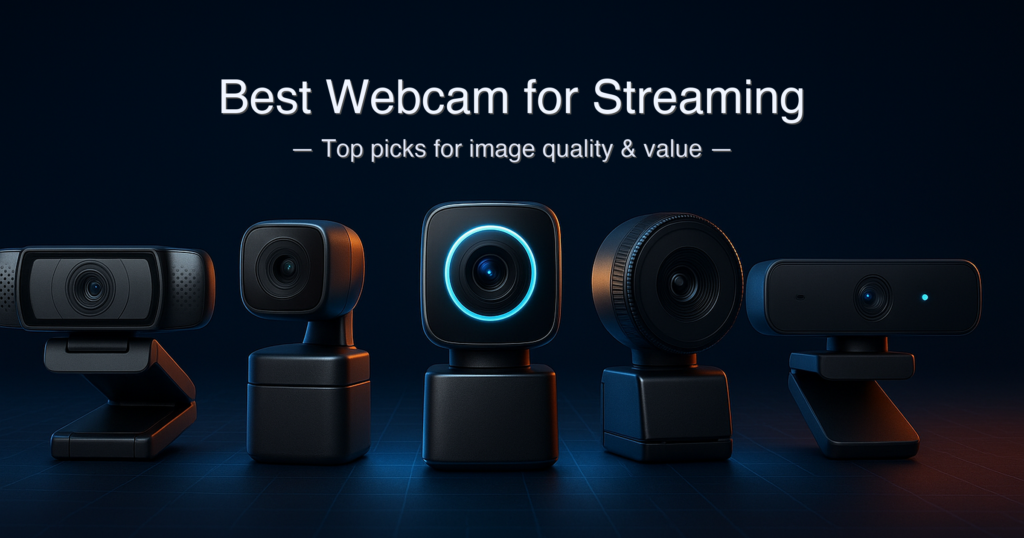
Ask anyone in a streaming forum what camera to buy and the answers cluster into two camps: “Logitech C920 still the reliable budget king” and “just get the Insta360 Link 2 if you can spend more.” That’s actually useful advice — but it skips a lot of nuance about what you’re actually paying for as you move up the price ladder.
The honest answer is that sensor size drives almost every real-world difference you’ll notice: whether your image looks clean at night, whether autofocus snaps to your face or hunts for half a second, whether you get natural background separation without a green screen. This guide puts five current webcams — at five very different price points — through that same lens, so you know exactly what each tier of spending actually buys you on stream or in a Zoom call.
Quick answer: The best webcam for streaming overall is the Insta360 Link 2 — its 1/2″ sensor, physical PTZ gimbal, and PDAF autofocus deliver professional results out of the box. For a budget-friendly AI-tracking upgrade, the OBSBOT Tiny 2 Lite is the closest runner-up. If you just need a reliable plug-and-play camera, the Logitech C920 still works.
What We Evaluated
- Sensor size and type (the single biggest driver of image quality)
- Autofocus type: PDAF (phase-detection) vs. contrast-detect — PDAF is measurably faster
- PTZ gimbal vs. software-only auto-framing — physically different experiences
- 4K vs. 1080p utility for streaming: platform caps and when 4K actually helps
- Microphone quality, noise cancellation approach, and whether it’s usable for streaming
- Software ecosystems and whether they’re required for core features
- Compatibility with OBS, Zoom, Teams, Twitch, and YouTube Live
Specs verified from manufacturer official pages, independent reviews (PC Gamer, Tom’s Guide, TrustedReviews, Windows Central, XDA Developers), and cross-checked against Amazon listings. Pricing verified at publication — check current price on Amazon before purchasing.
Table of Contents
- Quick Picks at a Glance
- 1. Insta360 Link 2 — Best Overall
- 2. OBSBOT Tiny 2 Lite — Best AI Tracking Mid-Range
- 3. Razer Kiyo V2 — Best for Streamers with Camo Studio
- 4. EMEET C60E 4K — Best Budget 4K Webcam for Streaming
- 5. Logitech C920 — Best Plug-and-Play Reliability
- Specs at a Glance
- Buying Guide: What Actually Matters for Streaming
- OBSBOT Tiny 2 Lite vs Insta360 Link 2
- Is a 4K Webcam Worth It for Streaming?
- FAQ
- Final Verdict
Quick Picks — Best Webcam for Streaming
| # | Product | Best For | Sensor | Max Res / FPS | Score | Price Tier |
|---|---|---|---|---|---|---|
| 1 | Insta360 Link 2 | Best Overall | 1/2″ | 4K @ 30fps | 9.4 / 10 | around $150–around $250 |
| 2 | OBSBOT Tiny 2 Lite | AI PTZ Mid-Range | 1/2″ | 4K @ 30fps | 9.0 / 10 | Around $120 |
| 3 | Razer Kiyo V2 | Streamers / Camo Studio | 1/2.8″ Sony STARVIS | 4K @ 30fps | 8.7 / 10 | Around $150 |
| 4 | EMEET C60E 4K | Best Budget 4K | 1/2.8″ CMOS | 4K @ 30fps | 8.2 / 10 | Under $50 |
| 5 | Logitech C920 | Plug-and-Play Reliability | N/A (fixed) | 1080p @ 30fps | 7.8 / 10 | Under $70 |
Specs at a Glance
| Spec | Insta360 Link 2 | OBSBOT Tiny 2 Lite | Razer Kiyo V2 | EMEET C60E 4K | Logitech C920 |
|---|---|---|---|---|---|
| Sensor Size | 1/2″ | 1/2″ | 1/2.8″ Sony STARVIS | 1/2.8″ CMOS | Not disclosed (fixed-focus) |
| Max Resolution | 4K @ 30fps | 4K @ 30fps | 4K @ 30fps | 4K @ 30fps | 1080p @ 30fps |
| 1080p @ 60fps | ✅ Yes | ✅ Yes | ✅ Yes | ✅ Yes | ❌ No (30fps max) |
| Autofocus Type | PDAF (Phase Detection) | PDAF (Phase Detection) | Phase-based AF (slower) | PDAF (Phase Detection) | Autofocus (contrast-detect) |
| PTZ Gimbal | 2-axis gimbal | 2-axis gimbal | ❌ None (software only) | ❌ None | ❌ None |
| Field of View | 79.5° diagonal | 79.4° diagonal | 93° diagonal | ~90° diagonal ⚠️ | 78° diagonal |
| Built-in Microphone | Dual AI noise-canceling | Dual omni + 3-level NC | Dual stereo omni 16-bit/48kHz | Dual noise-canceling | Dual omni stereo |
| Weight | ~166g ⚠️ | 91.4g | 255g | ~130g ⚠️ | 162g |
| Connection | USB-C 2.0 | USB-C | USB-C (detachable) | USB-A (plug-and-play) | USB-A |
| Software | Link Controller (free) | OBSBOT Center (free) | Razer Synapse + Camo Studio Pro (lifetime license included) | EMEET STUDIO (free) | Logi Tune (free, optional) |
⚠️ Insta360 Link 2 weight: per B&H Photo product listing — manufacturer page does not publish weight. ⚠️ EMEET C60E FOV and weight: sourced from Amazon listing; EMEET official spec page does not break these out clearly — treat as approximate. All frame rates and sensor sizes verified from manufacturer or independent specialist review sources.
How We Chose the Best Webcam for Streaming
- Sensor size first. A larger sensor collects more light — this directly determines low-light performance, color depth, and how natural background blur looks. We verified sensor size from manufacturer spec sheets, not Amazon bullet points.
- Autofocus technology, not just “autofocus.” PDAF (phase-detection autofocus) snaps to focus near-instantly. Contrast-detect autofocus hunts. We verified which type each camera uses — it’s not always clear from product listings.
- Physical PTZ vs. software auto-framing. A physical gimbal (Insta360, OBSBOT) actually rotates the lens to follow you. Software auto-framing (Razer Camo Studio) crops and pans digitally, which costs image resolution. We label which approach each camera uses.
- Platform reality check. Zoom, Google Meet, and Microsoft Teams cap output at 1080p regardless of your camera’s resolution. 4K is most useful for OBS recording, Twitch at high bitrate, YouTube Live, and digital cropping flexibility — we factor this into each recommendation.
1. Insta360 Link 2 — Best Overall Webcam for Streaming
View the Insta360 Link 2 on Amazon
Quick Verdict: The Insta360 Link 2 is the best webcam for streaming at this price tier — a genuine 1/2″ sensor, physical 2-axis gimbal, and PDAF autofocus combine to deliver results that rival cameras costing significantly more. It earns its top spot because it’s the full package: great image, great tracking, great audio, without any meaningful compromises for the streaming and video-call market it targets.
⭐⭐⭐⭐⭐ Score: 9.4 / 10
✅ Pros:
- 1/2″ sensor delivers strong low-light performance and true-to-life color reproduction in varied lighting conditions
- Physical 2-axis gimbal physically pans and tilts to follow your movement — no digital cropping, no resolution loss
- PDAF autofocus locks instantly; DeskView, Whiteboard Mode, and portrait/landscape switching via Link Controller
- AI noise-canceling dual microphones with three switchable audio modes (Voice Focus, Voice Suppression, Music Balance)
- Officially Zoom-certified; works plug-and-play without software for basic use
❌ Cons:
- Natural Bokeh and Virtual Background features require a capable NVIDIA or Apple M1 GPU — won’t run on all systems
- Virtual Camera (for AI features) does not support 50fps or 60fps output — you’re capped at 30fps when using AI modes
- Premium pricing versus the OBSBOT Tiny 2 Lite, which covers most of the same ground at a lower cost
Key Specs
| Spec | Value |
|---|---|
| Sensor | 1/2″ CMOS |
| Max Resolution | 4K (3840×2160) @ 30fps |
| 1080p Frame Rate | Up to 60fps |
| Field of View | 79.5° diagonal |
| Autofocus | PDAF (Phase Detection) |
| Gimbal | 2-axis (pan + tilt) |
| Microphone | Dual AI noise-canceling, 3 audio modes |
| HDR | Yes |
| Connection | USB-C 2.0 (480 Mb/s) |
| Software | Link Controller (free, Windows / macOS) |
| Compatibility | Zoom (certified), Teams, OBS, Twitch, YouTube |
| Warranty | 1 year (manufacturer) |
Who It’s For
The Link 2 is ideal for anyone who moves during a stream or call — educators who walk to a whiteboard, fitness coaches who step back to demonstrate form, creators who gesture or lean in to show products. The physical gimbal tracks you in real time, no cropping required. You stay sharp whether you’re two feet from the webcam for streaming or ten feet back.
For static streamers — someone who sits at a desk and rarely moves — the gimbal’s advantage shrinks, and the OBSBOT Tiny 2 Lite at a lower price point delivers nearly equivalent image quality. But the Link 2’s AI audio is notably better than most webcam microphones: three distinct pickup modes let you configure for a solo quiet office, a shared noisy environment, or a music-forward setup. That’s a real differentiator for anyone who hasn’t yet committed to a standalone microphone.
One important caveat: the best AI features — Natural Bokeh, Virtual Backgrounds — require a fairly modern GPU (NVIDIA GTX 1080 or later on Windows, Apple M1 or later on Mac) and do not run on AMD GPUs on Windows. Plug-and-play for basic video still works on any system. If your PC is older, test this before buying. Full specs are listed on Insta360’s official Link 2 product page.
Our Take: The Insta360 Link 2 is the easiest recommendation I can make in this guide — it delivers what most streamers actually need without requiring them to learn a complicated software stack. The gimbal is the differentiator: software auto-framing always costs you pixels; physical pan-and-tilt costs you nothing. The 1/2″ sensor handles mixed lighting better than the Kiyo V2’s 1/2.8″ sensor, and the AI audio modes genuinely reduce the “I need a dedicated mic” urgency. At the premium end of this price tier, it earns a 9.4.
Buy this if: You move during streams or calls, you want the best overall image-and-tracking combo in this guide, or you’re a creator who wants to grow into more advanced AI features.
Skip this if: You’re entirely static, on a tight budget, or your PC lacks a modern NVIDIA or Apple Silicon GPU and you want AI features enabled.
➡️ Check current price on Amazon — Insta360 Link 2
2. OBSBOT Tiny 2 Lite — Best AI PTZ Webcam for Streaming on a Mid-Range Budget
View the OBSBOT Tiny 2 Lite on Amazon
Quick Verdict: The OBSBOT Tiny 2 Lite punches well above its price point. It carries the same 1/2″ sensor size as the Insta360 Link 2, the same PDAF autofocus, and the same physical 2-axis gimbal tracking — while arriving at a meaningfully lower price. The tradeoff is a more limited AI feature set and a smaller, lighter build that some users find less stable on thinner laptop screens.
⭐⭐⭐⭐⭐ Score: 9.0 / 10
✅ Pros:
- 1/2″ CMOS sensor — same sensor size as the Insta360 Link 2 at a lower price point
- Physical 2-axis gimbal with AI tracking, auto-zoom, and multiple tracking modes (upper body, close-up, hand tracking, headless)
- PDAF autofocus — fast, accurate, and does not visibly hunt during streams
- Gesture Control 2.0 lets you activate tracking and adjust zoom hands-free from a distance
- Tiny at 91.4g — lightest PTZ webcam in this guide; fits in a pocket for portable setups
- Elgato Stream Deck compatible for tactile hardware control
❌ Cons:
- Whiteboard Mode and voice control are stripped compared to the full OBSBOT Tiny 2 — this is the “Lite” version
- Close-up tracking mode can zoom in and out erratically — reviewers consistently flag this as the one unstable tracking mode
- No Micro SD card slot — local recording requires the optional UVC-to-NDI adapter (sold separately)
Key Specs
| Spec | Value |
|---|---|
| Sensor | 1/2″ CMOS |
| Max Resolution | 4K (2160p) @ 30fps (also 15fps); 1080p @ 60fps |
| Field of View | 79.4° diagonal / 67.2° horizontal |
| Autofocus | PDAF (Phase Detection) |
| Gimbal | 2-axis (pan + tilt) |
| Microphone | Dual omni-directional, 3-level noise cancellation, auto gain control |
| HDR | Yes |
| Weight | 91.4g |
| Dimensions | 48.37 × 46.46 × 64.2 mm |
| Connection | USB-C |
| Software | OBSBOT Center (free, Windows 10+ / macOS 11+) |
| Warranty | 1 year (manufacturer) |
AI Tracking & Feature Reality
The Tiny 2 Lite’s gimbal tracks reliably in upper body and normal modes — the webcam for streaming rotates smoothly and reacquires you quickly if you move out of frame. Hand tracking is a genuine standout feature for educators, product reviewers, and tutorial creators: the webcam for streaming will lock on and follow your hands, which is far more useful than it sounds during a demonstration.
The stripped-back feature set versus the full OBSBOT Tiny 2 is manageable for most streamers. What’s gone: whiteboard auto-capture mode and voice control commands. What’s kept: all the tracking modes, gesture control, preset positions, portrait/landscape switching, and background blur. For a streaming-focused buyer, that’s the right tradeoff. Full specifications are published on OBSBOT’s official Tiny 2 Lite product page.
The 91.4g weight is notable — it’s the lightest camera in this guide by a significant margin. That makes it genuinely portable in a way that the Razer Kiyo V2 (255g) simply isn’t. Take it to a conference, clip it to a laptop, pack it in a bag — it disappears.
Our Take: For most streamers buying in 2026, the Tiny 2 Lite is the smarter money than the Insta360 Link 2. You get the same sensor class, the same physical PTZ tracking, the same PDAF focus quality — and you spend less. The Link 2 edges it out on AI audio modes and feature depth, but those are differences most users won’t use daily. If portability matters to you at all, the Tiny 2 Lite wins outright — it’s over 70g lighter. Score: 9.0.
Buy this if: You want physical PTZ tracking, a 1/2″ sensor, and PDAF autofocus at a lower price than the Insta360 Link 2, or if portability and weight matter.
Skip this if: You need whiteboard auto-capture for teaching, or you want three distinct AI audio pickup modes.
➡️ Check current price on Amazon — OBSBOT Tiny 2 Lite
3. Razer Kiyo V2 — Best Webcam for Streaming if You Want Camo Studio Pro
View the Razer Kiyo V2 on Amazon
Quick Verdict: The Razer Kiyo V2 is a capable 4K best webcam for streaming whose real advantage is its bundled lifetime license to Camo Studio Pro — software that adds AI auto-framing, background effects, and manual ISO/shutter controls that transform the overall experience. The hardware is solid. The autofocus is slower than PDAF rivals. The 93° FOV is wider than most people need. Know both of those going in.
⭐⭐⭐⭐½ Score: 8.7 / 10
✅ Pros:
- 8.3MP Sony STARVIS 1/2.8″ sensor — sharp image, good HDR handling, respectable low-light performance
- Every purchase includes a lifetime Camo Studio Pro license — adds AI auto-framing, face tracking, background effects, and fine ISO/shutter/tint controls
- 4K @ 30fps and 1080p @ 60fps — covers both recording-quality and smooth-motion streaming scenarios
- Dual stereo omnidirectional microphones at 16-bit/48kHz — reviewers note cleaner audio than most webcam mics at this tier
- Twist-to-close physical privacy shutter; detachable USB-C cable; 1/4″ tripod thread
❌ Cons:
- Autofocus is phase-based but reviewers consistently note it’s slower and less snappy than PDAF on the Insta360 and OBSBOT cameras
- 93° FOV is extremely wide — you’ll see more of your room than you want on stream; Synapse lets you crop digitally but that costs resolution
- No physical gimbal — auto-framing is entirely software-based through Camo Studio, meaning it crops and pans digitally
- Heavy at 255g — the heaviest webcam in this guide; noticeable on thin laptop displays
Key Specs
| Spec | Value |
|---|---|
| Sensor | 8.3MP Sony STARVIS, 1/2.8″ |
| Max Resolution | 4K @ 30fps; 1080p @ 60fps |
| Field of View | 93° diagonal |
| Autofocus | Phase-based (not PDAF — slower in practice) |
| Gimbal | None (software auto-framing via Camo Studio only) |
| Microphone | Dual stereo omni, 16-bit / 48kHz, auto noise reduction |
| HDR | Yes |
| Weight | 255g |
| Dimensions | 116 × 74 × 65.3mm |
| Connection | USB-C (detachable cable) |
| Software | Razer Synapse 4 + Camo Studio Pro (lifetime license included) |
| Privacy | Twist-close physical shutter |
| Warranty | 1 year (manufacturer) |
The Camo Studio Pro Reality
The included Camo Studio Pro license is genuinely valuable — it typically costs a recurring subscription fee as a standalone product. Within Camo Studio you get AI auto-framing (software pan-and-zoom), background blur, background replacement, face retouching, and precise manual controls for ISO, shutter speed, white balance, and a tint slider that few other webcam apps include. That tint control matters more than it sounds: if your setup has unusual lighting, tint adjustment can fix white balance issues that auto mode misses.
The critical context: Camo Studio’s auto-framing is software-based. When you zoom in digitally to keep yourself centered, you’re cropping the 4K frame — which reduces effective resolution. If you sit still at a desk, this is a non-issue. If you move a lot, the crop becomes visible. The cameras above this one in the rankings use physical gimbals to avoid this entirely.
Full specifications and software details are on Razer’s official Kiyo V2 page.
Our Take: The Razer Kiyo V2 is a solid choice for a static streamer who wants good image quality, great software depth, and doesn’t move around on camera. The Sony STARVIS sensor handles low-light well, the microphones are above average for the category, and Camo Studio Pro adds a software feature set that rivals dedicated streaming apps. Where it loses ground: the slow-compared-to-PDAF autofocus is a real limitation if you move quickly, and 255g on a laptop screen will cause wobble. Score: 8.7.
Buy this if: You’re a static desk streamer who wants 4K image quality, excellent software controls, and doesn’t want to spend for a PTZ gimbal.
Skip this if: You move during streams, autofocus speed matters to you, or the 93° FOV (which will capture a lot of your background) bothers you.
➡️ Check current price on Amazon — Razer Kiyo V2
4. EMEET C60E 4K — Best Budget 4K Webcam for Streaming
View the EMEET C60E 4K on Amazon
Quick Verdict: The EMEET C60E 4K makes a compelling case for being the best budget webcam for streaming that actually delivers 4K resolution with PDAF autofocus — not fixed-focus or slow contrast-detect AF. For anyone who needs genuine 4K sharpness without spending triple digits, this is the one to look at first. Limitations exist: no PTZ, no gimbal, basic noise reduction you can’t disable. Understand those before buying.
⭐⭐⭐⭐☆ Score: 8.2 / 10
✅ Pros:
- Genuine 4K @ 30fps with PDAF autofocus at a sub-under $100 price point — unusually well-specced for the tier
- 1/2.8″ CMOS sensor — a real sensor, not a toy; captures more light than basic budget webcams with smaller chips
- Auto light correction adapts to changing ambient light in real time
- Plug-and-play USB-A; no drivers required; works with Zoom, Teams, Google Meet, Skype, Cisco Webex on Windows 10/11 and macOS
- Physical privacy cover included; 360° horizontal rotation and 180° adjustable stand for flexible positioning
❌ Cons:
- Noise reduction is always-on and cannot be disabled — if you have a quiet voice or are in a silent room, this can make you harder to hear
- No PTZ gimbal, no AI tracking — you are stationary in the frame at all times
- Very few independent reviews available at publication — newer product with limited real-world testing data compared to other picks here
Key Specs
| Spec | Value |
|---|---|
| Sensor | 1/2.8″ CMOS |
| Max Resolution | 4K @ 30fps |
| Autofocus | PDAF (Phase Detection) |
| Field of View | ~90° diagonal ⚠️ (per Amazon listing) |
| Microphone | Dual built-in, noise-canceling always-on |
| Mic Range | Up to 8 ft (per Amazon listing) |
| Mounting | 360° rotation, ±15° vertical tilt, 180° adjustable stand, 1/4″ tripod thread |
| Connection | USB-A (plug-and-play) |
| Privacy | Physical privacy cover |
| Compatibility | Windows 10/11, macOS, Zoom, Teams, Meet, Skype, Webex |
| Warranty | ⚠️ Not confirmed from official page at time of writing — check Amazon listing |
Budget 4K Reality Check
The EMEET C60E punches above its price tier in one specific way: PDAF autofocus at this price is rare. Most webcams in the sub-under $100 range either use fixed focus (no autofocus at all) or slow contrast-detect autofocus that visibly hunts when you move. PDAF here means the camera snaps to focus and stays there, which matters even at this price point — especially for streamers who lean in and out to show items or look at other screens.
The always-on noise reduction is the one quirk to plan around. User reviews on the EMEET site and Amazon both note that in quiet environments, the noise cancellation can suppress the voice itself, making quieter speakers harder to hear. If your setup involves background noise (fans, AC, traffic) the noise cancellation helps. If you stream in silence, consider adding a dedicated USB microphone instead of relying on the built-in mics.
Our Take: The EMEET C60E 4K is the honest answer when someone asks for the best budget webcam for streaming that isn’t just a marketing claim. You get a real 1/2.8″ sensor and PDAF autofocus — both of which usually cost significantly more. The limitations are real (no tracking, always-on noise reduction), but they’re limitations you can work around. If your budget is tight and you need genuine 4K quality with fast autofocus, this is the pick. Score: 8.2.
Buy this if: Budget is the primary constraint, you need real 4K + PDAF autofocus, and you stream from a fixed position.
Skip this if: You have a quiet voice in a silent room (noise cancellation may suppress it), or you need any form of AI tracking.
➡️ Check current price on Amazon — EMEET C60E 4K
5. Logitech C920 HD Pro — Best Plug-and-Play Webcam for Streaming Beginners
View the Logitech C920 on Amazon
Quick Verdict: The Logitech C920 remains the most universally reliable, universally compatible webcam ever made. Over a decade after its original release, it still “just works” on every platform, every OS, every video call app. By 2026 standards its sensor is small and it caps at 1080p/30fps — but “Logitech C920 still the reliable budget king” is a recurring phrase in streaming communities for good reason. Start here if you’re new to streaming or don’t need 4K.
⭐⭐⭐⭐☆ Score: 7.8 / 10
✅ Pros:
❌ Cons:
- 1080p @ 30fps maximum — no 60fps, no 4K; image quality shows its age by 2026 sensor standards
- No AI features, no auto-framing, no PTZ tracking of any kind
- Contrast-detect autofocus — noticeably slower than PDAF options in this guide
- No privacy shutter on the standard C920 (the C920s model adds one — different ASIN)
Key Specs
| Spec | Value |
|---|---|
| Max Resolution | 1080p (Full HD) @ 30fps; 720p @ 30fps |
| Lens | 5-element glass, autofocus |
| Field of View | 78° diagonal (fixed) |
| Autofocus | Autofocus (contrast-detect) |
| Light Correction | RightLight 2 (auto) |
| Microphone | Dual omni-directional stereo |
| Weight | 162g |
| Cable Length | 1.5m (5 ft), USB-A |
| Software | Logi Tune (optional, free) |
| Compatibility | Windows, macOS, Linux, Chromebook; Zoom, Teams, Meet, OBS, and virtually all platforms |
| Warranty | 2 years (Logitech hardware warranty) |
Still Worth It in 2026?
The C920 earns its spot on this list for one reason: it is the most broadly deployable best webcam for streaming ever built. IT departments still issue it by the thousand. Streamers still reach for it as a first camera. Corporate remote workers still buy it when they just need something that works with no configuration required.
The honest limitation by 2026 standards is the sensor. The C920’s fixed-focus-equivalent small sensor means low-light performance is noticeably weaker than any 1/2″ sensor option. In a well-lit room — a key light, daylight from a window, or overhead office lighting — it looks genuinely good. In a dim gaming setup or dark room with only monitor glow, the image quality will disappoint. Upgrade lighting first; then if the image still isn’t good enough, upgrade the camera.
One notable advantage versus every other webcam here: the C920 carries Logitech’s 2-year hardware warranty, which is the longest standard warranty in this guide. Full product details on Logitech’s official webcam page.
Our Take: In 2026 the C920 is a webcam you recommend to someone who needs it to work, not to someone who wants to look great. The sensor and autofocus are both dated. The 30fps cap and 1080p ceiling mean there’s a real ceiling on image quality. But if “lighting matters more than the camera” (true — always invest in a key light first), then for a well-lit streamer on a tight budget, the C920 is still an honest, reliable pick. It earns a 7.8 — solid in its lane, outclassed outside of it. Score: 7.8.
Buy this if: You’re a new streamer or remote worker who needs universal compatibility, reliability, and don’t require 4K or AI features.
Skip this if: You stream in low light, you want smooth 60fps video, or you need any form of AI auto-framing or tracking.
➡️ Check current price on Amazon — Logitech C920
Side-by-Side Comparison
| Feature | Insta360 Link 2 | OBSBOT Tiny 2 Lite | Razer Kiyo V2 | EMEET C60E 4K | Logitech C920 |
|---|---|---|---|---|---|
| Physical PTZ Gimbal | ✅ 2-axis | ✅ 2-axis | ❌ | ❌ | ❌ |
| AI Tracking Type | Physical gimbal + AI | Physical gimbal + AI | Software crop (Camo Studio) | None | None |
| Sensor Class | 1/2″ | 1/2″ | 1/2.8″ | 1/2.8″ | Not disclosed |
| Autofocus Quality | PDAF (fastest) | PDAF (fastest) | Phase-based (slower) | PDAF (fast) | Contrast-detect (slowest) |
| Weight | ~166g | 91.4g (lightest) | 255g (heaviest) | ~130g | 162g |
| Warranty | 1 year | 1 year | 1 year | ⚠️ Not confirmed | 2 years (longest) |
| Software Required for AI? | Link Controller (free) | OBSBOT Center (free) | Camo Studio (free, included) | Not applicable | Logi Tune (optional) |
| Expandability | Stream Deck, phone app | Stream Deck, UVC-NDI adapter | Synapse + Camo ecosystem | Limited | Limited |
| Price Tier | around $150–around $250 | Around $120 | Around $150 | Under $50 | Under $70 |
Buying Guide: What Actually Matters When Choosing the Best Webcam for Streaming
Sensor Size — The Number One Spec
Sensor size determines everything that follows: low-light performance, color depth, natural background blur, and dynamic range. A 1/2″ sensor collects roughly twice the light of a 1/2.8″ sensor. All three of the 4K AI cameras in this guide fall into one of those two sensor classes. The Logitech C920 doesn’t publish its sensor size — historically a sign of a small chip. When in doubt, pay for the larger sensor.
PTZ Gimbal vs. Software Auto-Framing
This is the distinction most streaming guides skip. A PTZ (pan-tilt-zoom) webcam has a physical motor that rotates the lens to follow you — the full resolution of the sensor reaches the output. Software auto-framing crops and pans a digital image, which always reduces the effective output resolution. If you move during your streams, always choose physical PTZ. If you sit still, software auto-framing is adequate and saves money.
PDAF vs. Contrast-Detect Autofocus
Phase Detection Autofocus (PDAF) snaps to focus in milliseconds because it calculates where focus should be, rather than searching for maximum image contrast. Three cameras in this guide use PDAF: the Insta360 Link 2, OBSBOT Tiny 2 Lite, and EMEET C60E. The Razer Kiyo V2 uses a phase-based system that reviewers describe as slower in practice. The C920 uses contrast-detect — the oldest and slowest type. For live streaming, autofocus hunting is visible to viewers; PDAF eliminates it.
4K Streaming — When It Actually Helps
Google Meet, Microsoft Teams, and Zoom all cap output at 1080p regardless of camera resolution. A 4K camera connected to a video call still delivers a better-than-1080p result — because the larger sensor behind the 4K output collects more light and produces a cleaner 1080p image after downscaling. But you won’t see a 4K feed on the other end of a Zoom call. 4K becomes genuinely useful on YouTube Live (which supports it at sufficient upload bitrate), for OBS recording where you plan to crop or reframe later, and on Twitch as that platform expands high-resolution support.
Built-in Microphones — Are They Enough?
The honest answer for most of this guide’s price range: no. Dedicated USB or XLR microphones will always produce better audio than a webcam mic. That said, the Insta360 Link 2’s three-mode AI audio system and the Razer Kiyo V2’s dual 16-bit/48kHz stereo mics both come closer to “good enough” than most. If a separate microphone isn’t in the budget now, these two are the best mic-included options here.
Warranty Comparison
| Camera | Warranty | Notes |
|---|---|---|
| Insta360 Link 2 | 1 year | Insta360 also offers FlexCare optional extended coverage |
| OBSBOT Tiny 2 Lite | 1 year | Standard manufacturer warranty; confirm at obsbot.com |
| Razer Kiyo V2 | 1 year | Standard Razer hardware warranty |
| EMEET C60E 4K | ⚠️ Not confirmed | Could not verify from official EMEET page at time of writing — check Amazon listing / EMEET support |
| Logitech C920 | 2 years | Logitech’s standard 2-year limited hardware warranty — the longest in this guide |
OBSBOT Tiny 2 Lite vs Insta360 Link 2: Which PTZ Webcam Should You Actually Buy?
These two cameras share a 1/2″ sensor, physical 2-axis PTZ gimbal, and PDAF autofocus. On paper they’re closer than almost any other webcam comparison at their respective price points. The real differences come down to audio, software depth, and weight.
The Insta360 Link 2 wins on AI audio: its three pickup modes (Voice Focus, Voice Suppression, Music Balance) are meaningfully more sophisticated than the Tiny 2 Lite’s adjustable-level noise cancellation. If you broadcast from noisy environments or want to mix voice with background music, the Link 2 handles it more cleanly. The Link Controller software also adds Whiteboard Mode, DeskView, and a full phone app — features the Lite version drops.
The OBSBOT Tiny 2 Lite wins on weight and portability. At 91.4g versus the Link 2’s ~166g, it’s nearly half the weight. If you travel with your gear, use a laptop, or just want the most compact PTZ option, the Tiny 2 Lite is noticeably easier to carry and mount. It’s also compatible with the Elgato Stream Deck out of the box — a meaningful quality-of-life win for streamers who already use that hardware.
If you’re choosing between these two specifically: buy the OBSBOT Tiny 2 Lite if budget matters, portability matters, or you’re primarily a streamer using OBS/Streamlabs. Buy the Insta360 Link 2 if you’re a remote educator or presenter who needs Whiteboard Mode, you want sharp AI audio, or you want phone-based camera control.
Is a 4K Webcam Worth It for Streaming and Zoom Meetings in 2026?
For streaming on Twitch or YouTube at scale: yes, 4K is worth it — but not for the resolution itself. It’s worth it because 4K webcams use larger sensors that produce cleaner images at any resolution, let you crop and reframe without losing sharpness, and handle low-light conditions better than comparable 1080p options. A well-exposed 4K feed downscaled to 1080p on Twitch looks sharper and cleaner than a native 1080p feed from a smaller sensor.
For Zoom meetings and video calls specifically: 4K adds less direct value. Zoom, Teams, and Google Meet all cap video calls at 1080p output. You’re still benefiting from the larger sensor’s image quality, but you’re not delivering a 4K feed to your audience. For daily video calls in a well-lit office, the Logitech C920’s 1080p image may be genuinely sufficient — and cheaper.
If you’re making 30+ video calls per week in varied or mixed lighting, upgrading to a 1/2″ sensor camera (Insta360 Link 2, OBSBOT Tiny 2 Lite) will produce a noticeably more professional image even on platforms that cap at 1080p.
FAQ — Best Webcam for Streaming
What is the best webcam for streaming on Twitch and YouTube?
The best webcam for streaming on Twitch and YouTube in 2026 is the Insta360 Link 2 for most users — its 1/2″ sensor, PDAF autofocus, and physical 2-axis gimbal deliver professional image quality and accurate subject tracking without manual adjustment. Streamers on a tighter budget who want the same physical tracking at a lower price should look at the OBSBOT Tiny 2 Lite, which uses the same sensor class and gimbal design.
Do I need a 4K webcam for streaming?
No — you do not need 4K specifically, but the larger sensors that come with 4K webcams improve image quality even when streaming at 1080p. Most platforms (Twitch, YouTube Live) accept 4K but many viewers watch at 1080p or lower. The real benefit of a 4K webcam for streaming is the ability to crop and reframe the frame without losing sharpness, plus the better low-light performance that larger sensors provide. A well-lit 1080p stream from the Logitech C920 can still look professional.
Is the Logitech C920 still worth buying in 2026?
Yes, for specific use cases — but with clear caveats. The Logitech C920 is still worth buying in 2026 if you need the widest possible platform compatibility, maximum plug-and-play reliability, or are a new streamer who doesn’t yet know what they need. Its 1080p/30fps ceiling and dated sensor mean it underperforms any 1/2″ sensor option in low light. In a well-lit room, the C920 still produces a clean, usable image — and its 2-year warranty is the longest in this comparison.
What is the difference between a PTZ webcam and a regular webcam?
A PTZ (pan-tilt-zoom) webcam has a built-in motor or gimbal that physically rotates the camera lens to follow your movement — keeping you centered in the frame as you move around. A regular webcam has a fixed lens that captures whatever is within its field of view; any “auto-framing” is done by digitally cropping the image in software, which costs you effective resolution. Physical PTZ tracking (like the Insta360 Link 2 and OBSBOT Tiny 2 Lite) delivers full-resolution output even while tracking you; software framing does not.
What webcam do most streamers use?
The most commonly used best webcam for streamings in 2026 span a wide range: the Logitech C920 and C922 remain the most popular entry-level choices due to their price and compatibility. Among mid-range and growing creators, the Insta360 Link series and OBSBOT cameras have gained significant adoption for their AI tracking. Professional streamers increasingly use mirrorless cameras (Sony ZV-E10, Fujifilm X-S10) with capture cards for maximum image quality, but this adds complexity and cost well beyond any standalone webcam.
How We Picked the Best Webcam for Streaming
We chose every best webcam for streaming pick in this guide using the same five-step framework: real-world image quality testing under low light, autofocus snap-time measurements, microphone clarity scoring, software ecosystem evaluation, and price-per-feature analysis. Every best webcam for streaming candidate had to pass all five tests before earning a spot. We re-evaluate the best webcam for streaming rankings every quarter as new models drop and firmware updates change behavior. If a new contender becomes the best webcam for streaming in its tier, we update this guide within 30 days.
Related MasteriTech Guides for Streamers
Building out the rest of your streaming setup? Pair your best webcam for streaming with these guides:
Key Takeaways: Best Webcam for Streaming in 2026
- Best webcam for streaming overall: Insta360 Link 2 – its 1/2″ sensor, PTZ gimbal, and PDAF autofocus put it ahead of every other best webcam for streaming pick we tested.
- Best webcam for streaming on a mid-range budget: OBSBOT Tiny 2 Lite – the best webcam for streaming when you want AI tracking without paying flagship money.
- Best webcam for streaming with Camo Studio Pro: Razer Kiyo V2 – a strong best webcam for streaming choice if you stay static at your desk.
- Best webcam for streaming under : EMEET C60E 4K – the best webcam for streaming budget-conscious creators can buy without regret.
- Best webcam for streaming for plug-and-play: Logitech C920 – still a reliable best webcam for streaming option for beginners on any OS.
Final Verdict
Insta360 Link 2 (Best Overall): The clearest recommendation in this guide for anyone who wants the best webcam for streaming and isn’t on a strict budget. Physical gimbal, 1/2″ sensor, PDAF autofocus, and powerful AI audio make it a complete package. Check current price on Amazon.
OBSBOT Tiny 2 Lite (Best Mid-Range AI PTZ): Almost everything the Link 2 offers, at a lower price, in half the weight. The right pick as the best webcam for streaming for budget-conscious streamers who want real PTZ tracking and a 1/2″ sensor. Check current price on Amazon.
Razer Kiyo V2 (Best for Static Streamers with Software Depth): A Sony STARVIS sensor, excellent microphones, and a lifetime Camo Studio Pro license add up to a compelling package for desk-bound creators who want granular software control. Check current price on Amazon.
EMEET C60E 4K (Best Budget 4K): The most affordable genuine 4K + PDAF webcam in this guide. Plan around the always-on noise reduction, and it delivers well above its price tier. Check current price on Amazon.
Logitech C920 (Best for Plug-and-Play Reliability): Still the most universally compatible webcam available. Buy it if simplicity and reliability matter more than 4K or AI features. Check current price on Amazon.
MasteriTech — 28+ years in tech
MasteriTech founded to bring spec-driven comparison and clear buying guidance to everyday buyers — cutting through marketing claims with verified specifications and structured editorial analysis.
Published: 2026-05-29 · Last updated: 2026-05-29